No products in the cart.



Interior Fit-out Project OS Lite — Fit-out Management + Snag List + Payment Milestones | Notion Template
10 $
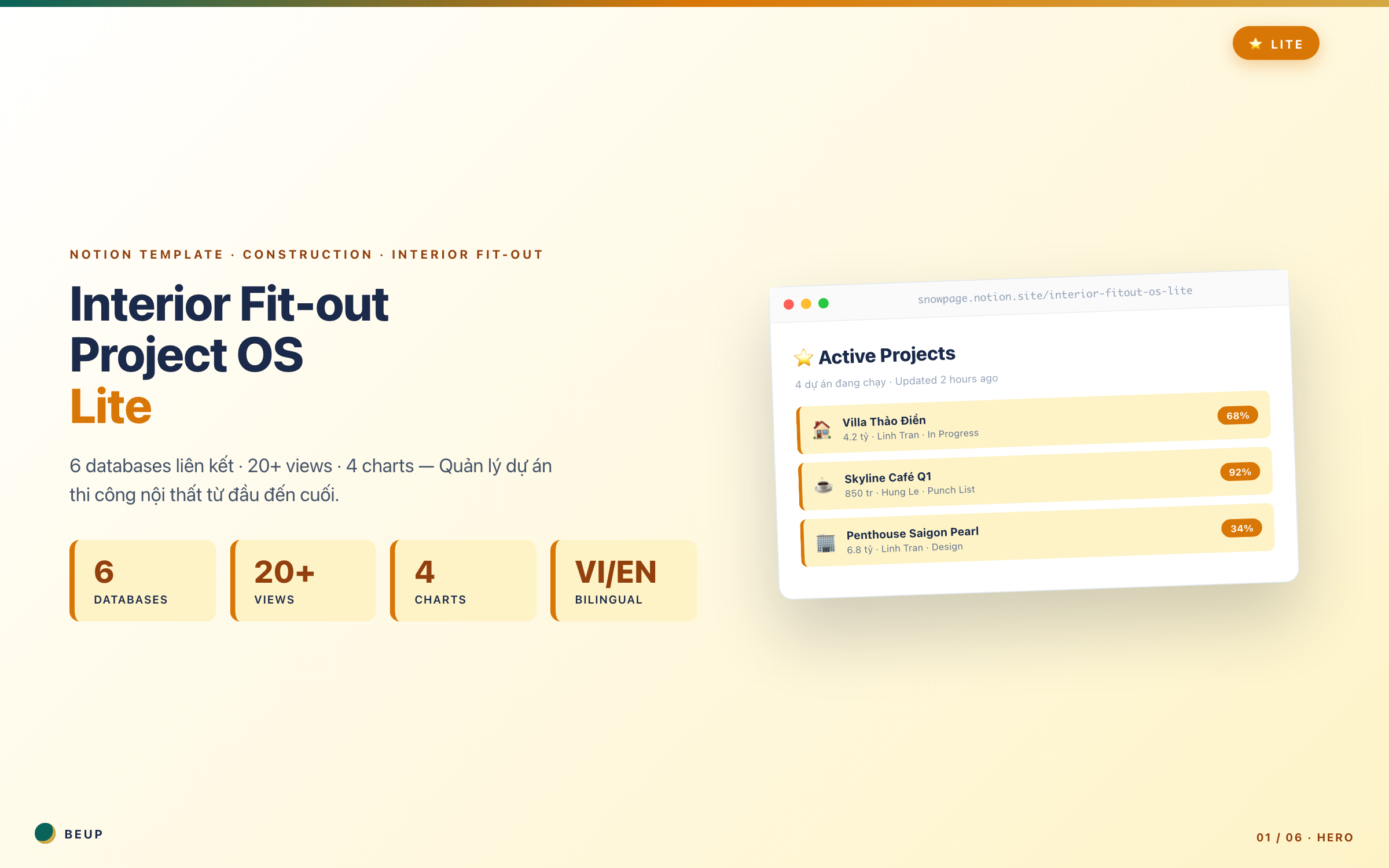
Your studio is running 3-5 projects at once. Two things happened last month: you forgot the Progress 40% payment milestone for Skyline Café — that's 340M VND missing from your cash flow. Villa Q7 handed over but the client found 8 construction defects nobody had tracked — you spent 2 weeks fixing them. You lost sleep. Lite is the 199k VND version I designed for exactly that moment. 6 linked databases (adds Snag List + Payment Milestones), 4 visual charts, Budget Variance formula that auto-compares budget vs actual. Still runs on free Notion — no expensive tools needed.
Lite is the 199k version I designed for that moment. 6 linked databases (including Snag List + Payment Milestones), 4 visual charts, Budget Variance formula to compare budget vs actual expenses. Still Notion for free — no need to invest in expensive tools.
Sold: 0 items
Category:
BEUP Brain
Last month, two things happened at your studio.
Một: Dự án Skyline Café — bạn quên đợt thanh toán Progress 40% (340 triệu). Phát hiện lúc cuối tháng khi review cashflow. Khách bảo “đợi anh kiểm tra lại hợp đồng đã” — kéo dài thêm 3 tuần. Tiền vào trễ, NCC chính giận, suýt mất uy tín.
Two: Villa Q7 was handed over, the customer discovered 8 errors that no one tracked — cracks in the wall of bedroom 2, LED kitchen lights in the middle, wooden floor in the bathroom was bulging. Had to repair for 2 weeks. The customer wrote a 3-star review. The project's profit lost 40%.
You lost sleep that week. This Lite version is a tool I designed for that moment — adding 2 key databases (Snag List + Payment Milestones), 4 visual charts, Budget Variance auto-calc. Still using Notion for free.
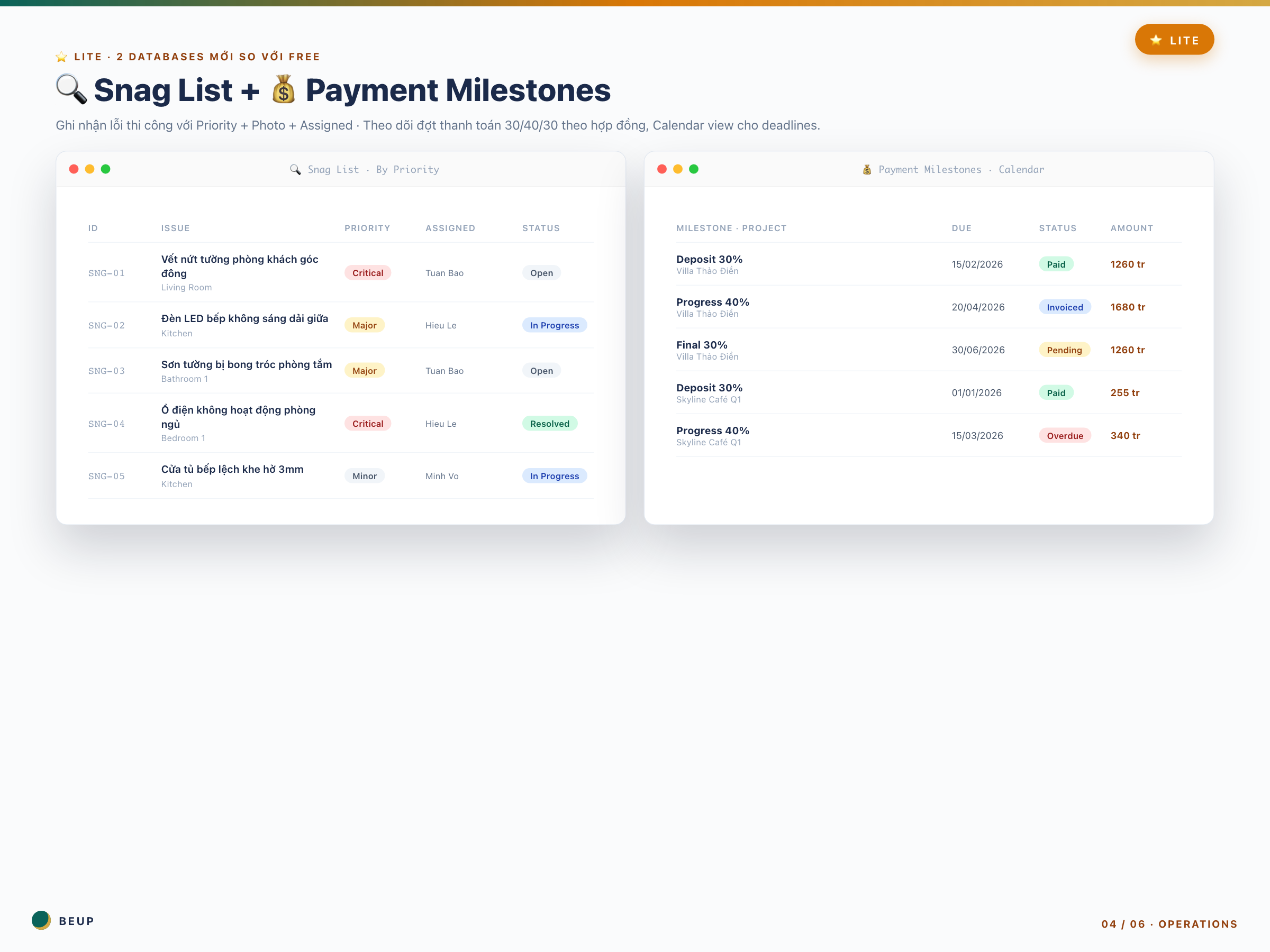
2 NEW DATABASES COMPARED TO FREE — A lifesaver for the studio
- 🔍 Snag List (Construction defect list) — Khi đi khảo sát công trường trước bàn giao, mở Snag List, ghi mọi lỗi: vết nứt, sơn bong, ổ điện hỏng. Gắn Priority (Critical/Major/Minor), chụp ảnh tải lên, gán cho thợ nào sửa. Mỗi snag có status từ Open → In Progress → Resolved. Buổi nghiệm thu, bạn mở Snag List ra cho khách thấy — 8 lỗi nhỏ đã xử lý hết. Không còn cảnh khách “phát hiện ra” lúc bàn giao.
- 💰 Payment Milestones (Payment by contract) — Khi ký hợp đồng, ngồi xuống tạo 3 đợt: Deposit 30%, Progress 40%, Final 30%. Set Due Date theo timeline. Calendar view tự nhắc bạn 1 tuần trước mỗi đợt. Khách trả tiền thì tick “Paid”. Không còn cảnh quên 340 triệu như Skyline.
4 ĐẶC ĐIỂM “NHÌN LÀ HIỂU” CỦA LITE
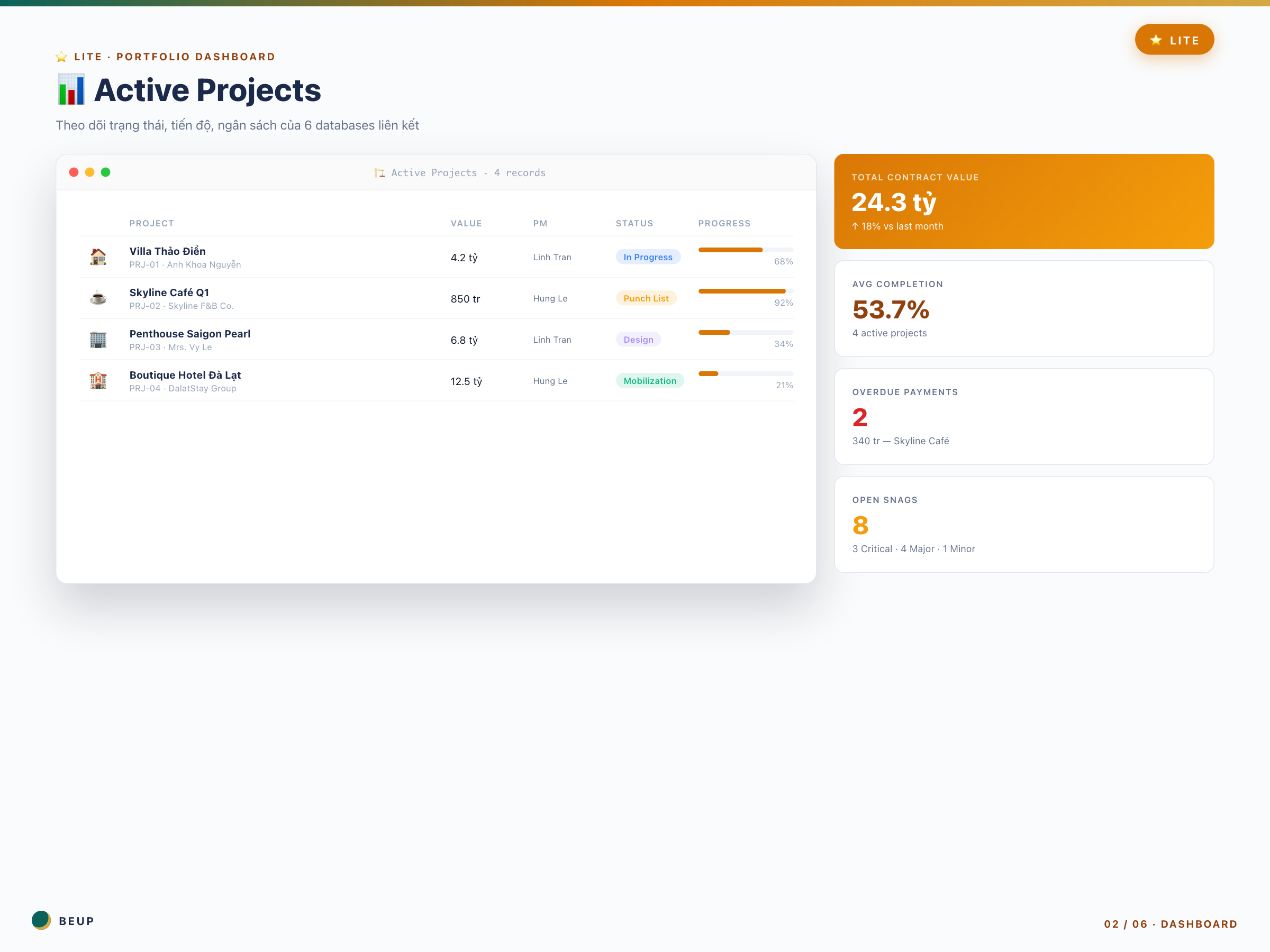
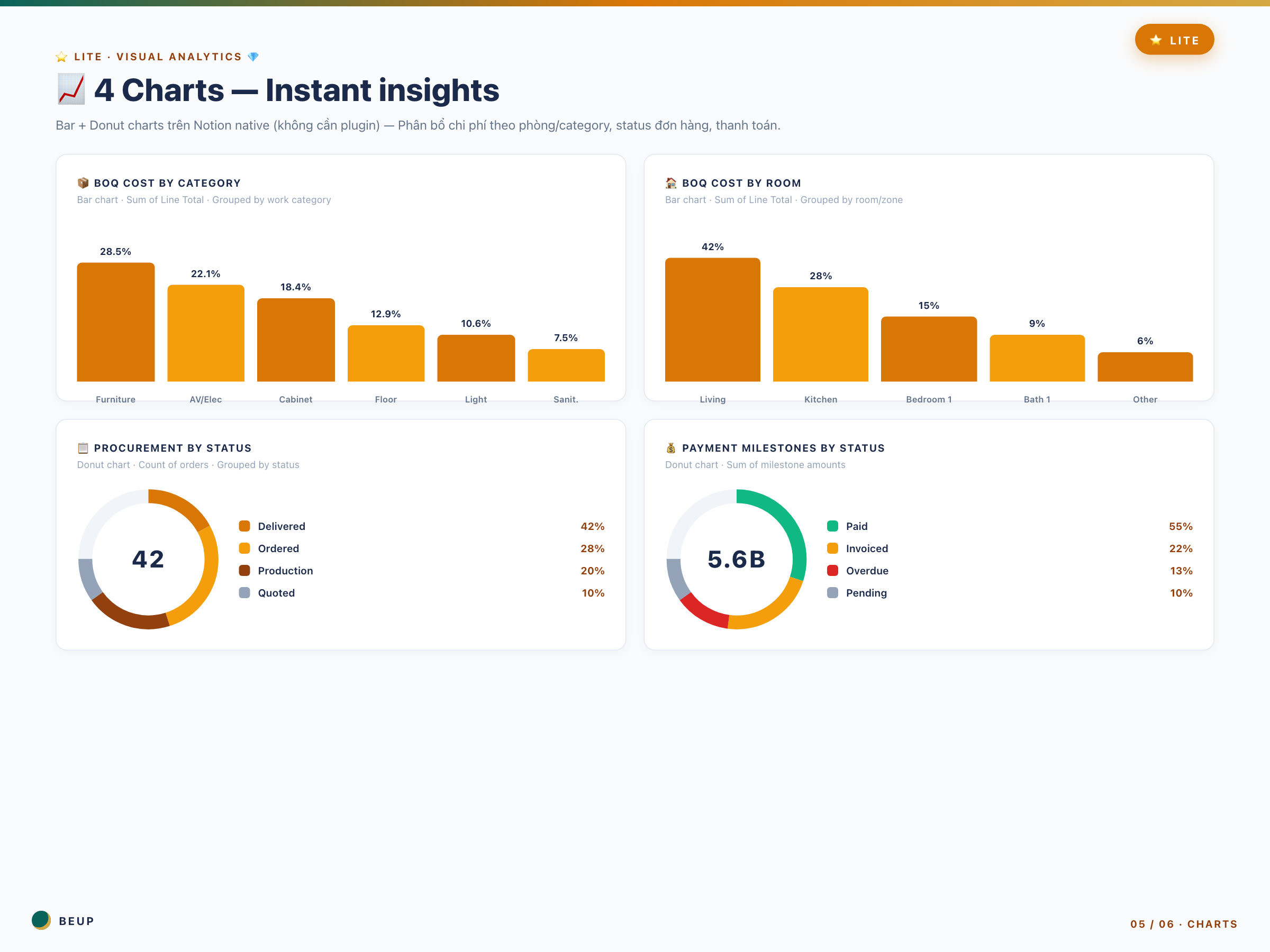
- 📈 4 charts Visual Analytics — Mở Hub page là thấy ngay: Bar chart “BOQ Cost by Room” (Living Room chiếm 42% ngân sách → cần focus). Donut chart “Procurement by Status” (62% đã đặt → còn 38% chưa đặt → tuần này phải push). Donut chart “Payment Milestones” (55% paid, 13% overdue → cần đi đòi). Bar chart “BOQ Cost by Category” (Furniture chiếm 28.5% → đàm phán giá NCC).
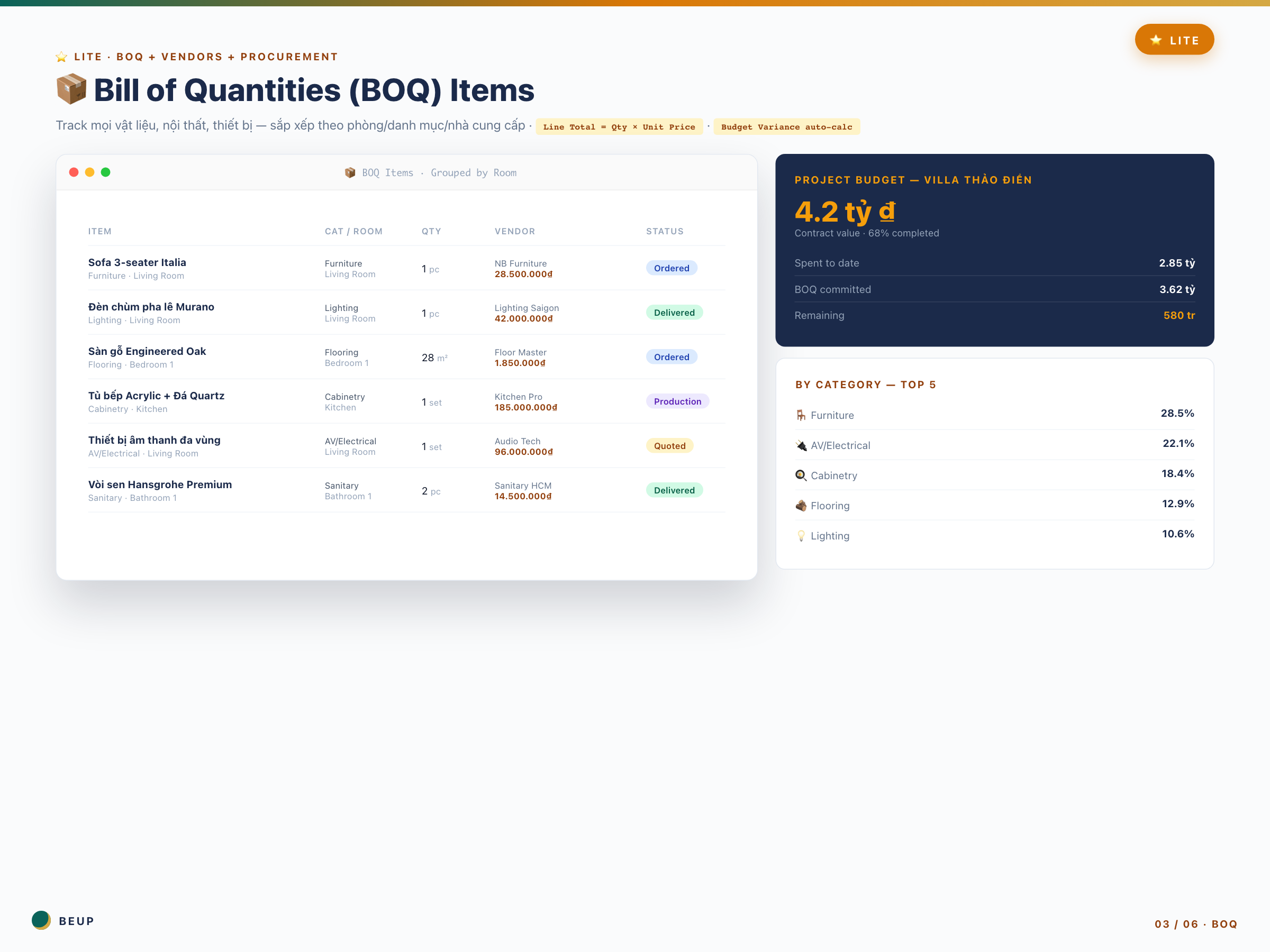
- 🧮 Budget Variance formula — Automatically calculate the delta between the projected Budget and actual Cost. Project Villa Thảo Điền has a budget of 4.2 billion, and so far 3.6 billion has been spent (86% spent but only 68% completed) → red flag → you know you need to control the rest.
- 📊 Visual Analytics + Operations Tracker dashboard — Summary of BOQ Items Needing Attention, Upcoming Deliveries in the next 7 days, Snag List Unresolved, Unpaid Orders. A single dashboard to check every morning.
- 20+ ready-to-use views — Projects (5 views), BOQ (5 views), Vendors (3 views), Procurement (4 views), Snag List (3 views), Payment Milestones (3 views). No need to set up, just click to use.
WHO IS THIS FOR?
Interior studio for 3-10 people — Bạn đã qua giai đoạn solo freelance. Có cộng sự, có thợ, có khách quen. Vấn đề không còn là “có khách không” mà là “quản lý không bị loạn không”.
Newly promoted Project Manager — Bạn vừa được giao 3-4 dự án để quản. Sếp expect bạn deliver — không có lý do để “em quên”.
Site Supervisor — You go to the construction site every day. Need to record errors quickly on your phone. Notion mobile app + Snag List = you can save 20 errors/day, with photo evidence.
Quantity Surveyor (QS) — You handle BOQ + procurement but now have the added responsibility of comparing budget vs actual spending. Budget Variance formula does it for you.
Suitable size: 3-5 projects simultaneously · budget of 2-8 billion/project · team collaboration.
Not suitable if: You only work on 1-2 projects (Free is enough) or you manage 5-10+ projects and need a Portfolio dashboard + audit trail (upgrade to Pro 499k).
WHAT'S INCLUDED?
- 1 Notion workspace with 6 linked databases (Free 4 + Snag List + Payment Milestones)
- 20+ views available — Table, Board, Calendar, Gallery, Timeline, Filtered views
- 4 native Notion charts (Bar + Donut) — no external plugin needed
- Budget Variance formula already set up in Projects database
- Sample data: 3 projects + 34 BOQ items + 10 orders + 8 snags + 9 payment milestones
- Hub page with Visual Analytics dashboard + Operations Tracker
- Full User Guide — TLDR for each database + toggle details
- Bilingual: property names in English, instructions in Vietnamese
REALISTIC WORKFLOW — Your typical day with Lite
- 7:00 AM: Open Hub page → view Visual Analytics dashboard. 30 seconds to grasp the situation of 3-5 projects.
- 7h30: Mở “Unpaid Orders” → có 2 đơn quá hạn. Gọi 2 NCC.
- 8h-12h: Đi công trường Villa Thảo Điền. Phát hiện 3 lỗi → mở Notion mobile, ghi Snag List với photo + Assigned To “Tuấn Bảo”. Set Priority Critical.
- 14h-15h: Skyline Café customer calls to ask about progress. Open project page → see 92% completion + payment milestone Progress 40% approaching (15/3) → respond confidently.
- 17h: Mở chart “Procurement by Status” → 62% Delivered, 28% Ordered, 10% Quoted. Tuần này push 28% Ordered thành Delivered.
- End of month: Mở chart “Payment Milestones by Status” → 55% Paid, 13% Overdue → biết phải đi đòi 13% trong 2 tuần tới.
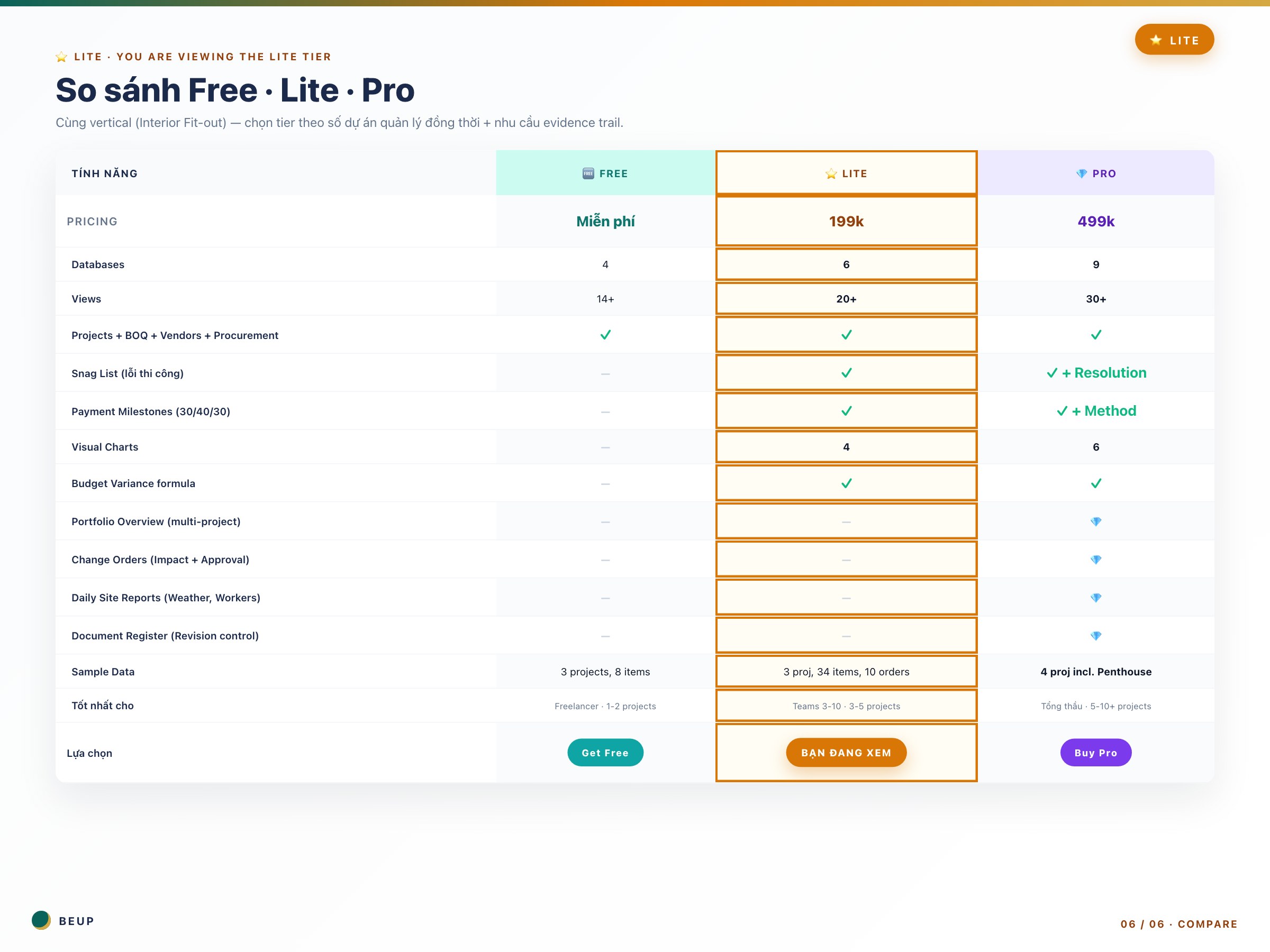
COMPARE FREE vs LITE vs PRO
| The issue you're facing | 🆓 Free | ⭐ Lite (this) | 💎 Pro |
|---|---|---|---|
| “Quản lý 1-2 dự án thì OK” | ✓ Done | Fee | Overpriced |
| “Quên đợt thanh toán milestone” | — | ✓ Calendar reminder | ✓ + Overdue |
| “Khách phát hiện lỗi lúc bàn giao” | — | ✓ Snag List | ✓ + Resolution |
| “Không biết phòng nào tốn nhất ngân sách” | — | ✓ Bar chart | ✓ Bar chart |
| “Quản lý 5-10+ dự án cần tổng quan” | — | Bắt đầu chật | 💎 Portfolio |
| “Khách kiện cần bằng chứng evidence” | — | — | 💎 Daily Reports |
| “Bản vẽ thay đổi nhiều phiên bản” | — | — | 💎 Doc Register |
| “Change Order khách yêu cầu giữa chừng” | — | Track qua BOQ | 💎 Approval workflow |
Cần ít hơn? Free vẫn ngon nếu bạn chỉ làm 1-2 dự án. Dùng Free →
Cần hơn? Pro 499k cho công ty 5-10+ dự án với audit trail. Xem Pro →
SYSTEM REQUIREMENTS
- Minimum: Notion account (Free plan đủ — không cần Plus). Chrome/Edge/Safari/Firefox bản mới.
- Recommended: Notion desktop app + mobile app — team trên công trường ghi Snag List qua mobile rất nhanh.
- No need for: Plugin ngoài. Tool tracking riêng. Excel parallel.
CÂU HỎI HAY ĐƯỢC HỎI
Mình đang dùng Free, có nên nâng cấp lên Lite không?
3 dấu hiệu nên lên Lite: (1) Bạn quên/sót payment milestone tháng qua. (2) Có vụ khách phát hiện lỗi thi công lúc bàn giao mà bạn không track. (3) Bạn đang quản lý 3+ dự án và Excel/Free đã bắt đầu loạn.
Snag List khác BOQ thế nào?
BOQ là vật tư (cái sofa, cái đèn, cái sàn). Snag List là lỗi (vết nứt, sơn bong, đèn không sáng). Khác source data hoàn toàn. Snag List dùng giai đoạn cuối — khảo sát công trường trước bàn giao.
Payment Milestones có nhắc tự động không?
Notion không tự gửi email reminder (đó là tính năng Notion Plus). Nhưng Calendar view + filter “Due trong 7 ngày” cho bạn nhìn rõ. Cách dùng: mở Calendar mỗi sáng 30 giây.
4 charts có giới hạn gì không?
Notion charts (ra mắt 2024) là native — không cần plugin. Hoạt động trên Free plan. Tự update khi data thay đổi. Giới hạn: chỉ Bar + Donut, chưa có Line chart.
Budget Variance formula sai số bao nhiêu?
Không sai. Đây là phép tính đơn giản: Variance = Spent – Budget. Notion formula chính xác đến đơn vị đồng. Vấn đề duy nhất: bạn phải nhập đúng “Spent” — tức là phải link mọi BOQ Item đến Project.
Khi nào nên lên Pro 499k?
3 dấu hiệu: (1) Bạn quản lý 5+ dự án và cần Portfolio dashboard tổng quan. (2) Khách yêu cầu Change Orders chính thức với approval ký số. (3) Bạn từng bị khách kiện và cần Daily Site Reports làm evidence trail.
Only logged in customers who have purchased this product may leave a review.
Related products
- Buy Now This product has multiple variants. The options may be chosen on the product page

A Digital Asset Ecosystem and Work Operating System for Individuals & Teams
SUPPORT
Copyright © 2026 BEUP Learning Solutions
MST: 3301755602
Reviews
There are no reviews yet.