No products in the cart.



Interior Fit-out Project OS Pro — Multi-Project + Change Orders + Document Register | Notion Template
499.000 VND
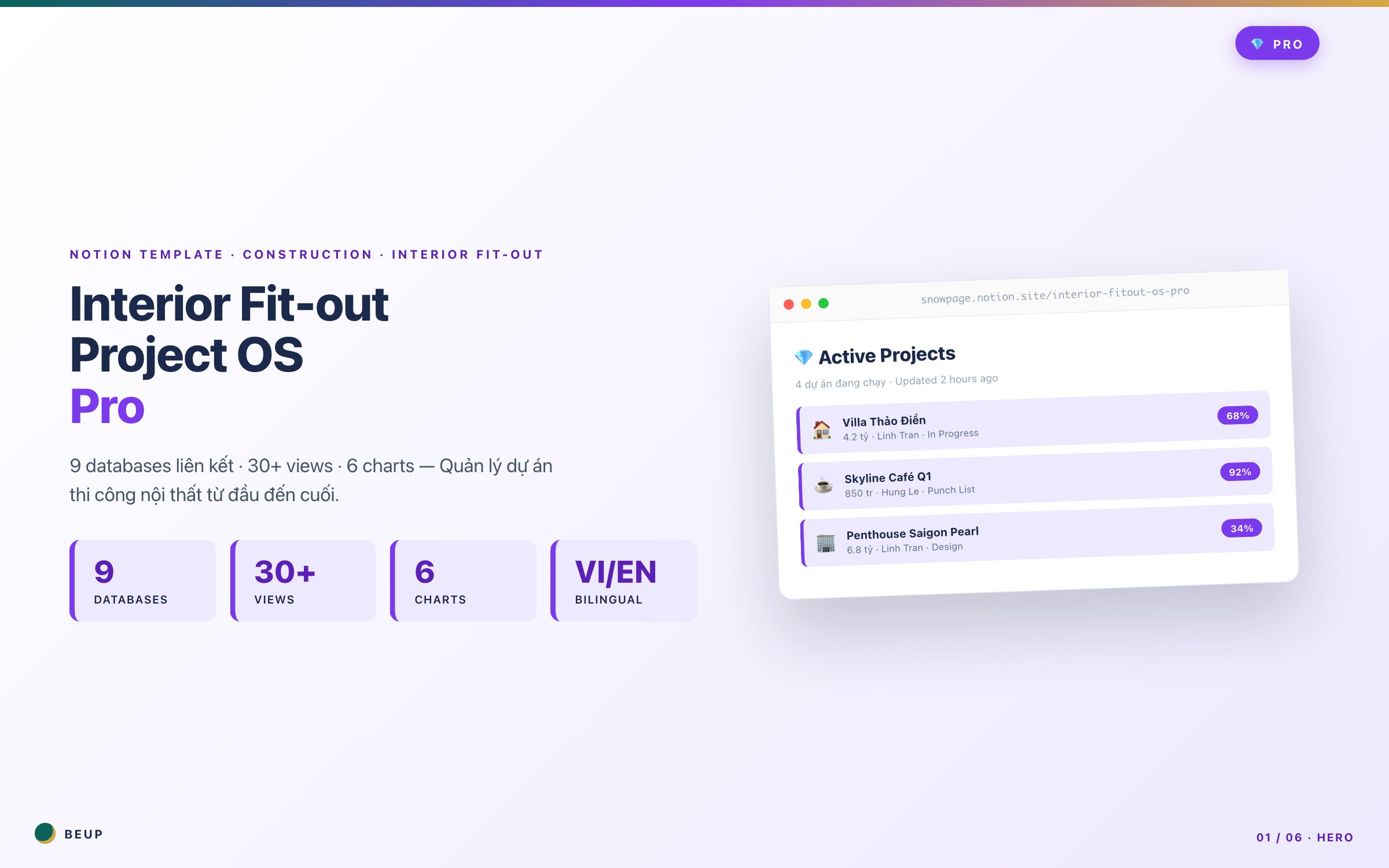
Monday 7am. You're managing 7 interior fit-out projects — Villa Thao Dien 68% complete, Skyline Café about to hand over, Penthouse just signed. First questions in your head: "Which project has overdue payment? Which site needs visiting today? Whose change order is waiting for approval?" If you spend 30 minutes each morning opening 4 Excel files + 3 Zalo groups + email to answer these 3 questions — Pro at 499k VND is for you. 9 linked databases, Portfolio Overview showing all projects in one screen, Change Orders with audit trail and approval workflow, Daily Site Reports for legal evidence. The system I use for my own company — now sharing with your team.
If you spend 30 minutes every morning opening 4 Excel files + 3 Zalo groups + email to answer these 3 questions — Pro 499k is for you. 9 linked databases, Portfolio Overview of all projects on one screen, Change Orders with audit trail and approval workflow, Daily Site Reports for legal evidence. The system I use for my own company — now sharing with your team.
Sold: 0 items
Category:
BEUP Brain
Monday morning 7am. Second coffee break.
You are managing 7 interior projects simultaneously. Thao Dien Villa 68% complete, Skyline Café about to be handed over, Saigon Pearl Penthouse just signed the contract, Da Lat Boutique Hotel just mobilized. You have 3 questions in mind:
- Which project is overdue for payment and needs to be followed up?
- Which site needs to be checked today?
- Who is waiting for change order approval?
If you have to answer these 3 questions, you have to open Asana + 4 Google Sheets files + 3 Zalo groups + email — you've just wasted 30 minutes every morning. That's 130 hours/year burned on aggregation.
Pro is the system I designed for that moment. 9 linked databases, multi-project Portfolio Overview, Change Orders with approval workflow, Daily Site Reports for legal evidence, Document Register with revision control. You open Notion → 5 minutes to grasp everything → get to work.
4 KEY FEATURES OF PRO THAT LITE DOES NOT HAVE
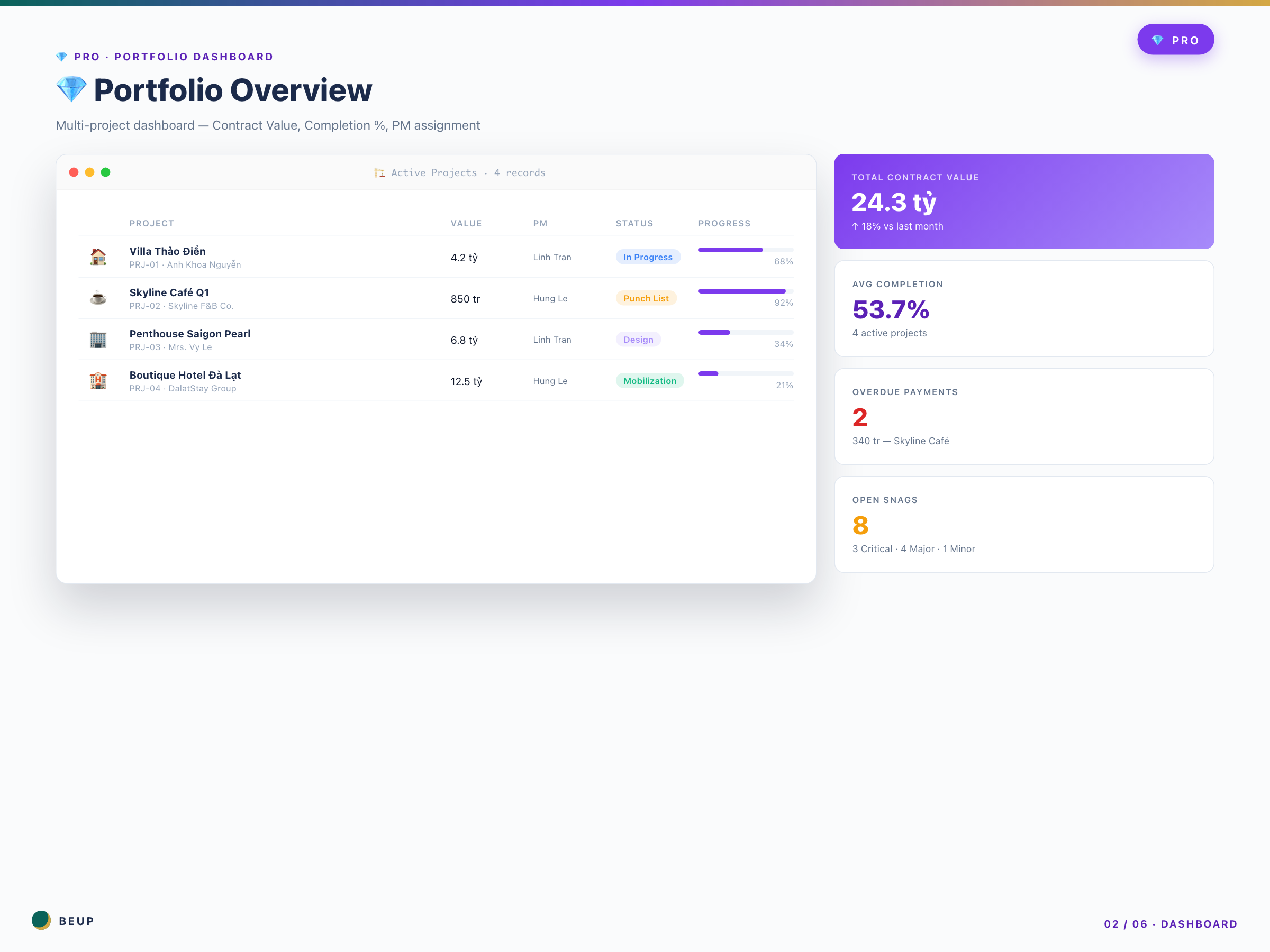
- 💎 Portfolio Overview Dashboard — The first page you see: all 7 projects, each project 1 row, with Contract Value (24.3 billion total), Completion % (53.7% avg), PM assignment (Linh or Hùng), Status (In Progress / Punch List / Design / Mobilization). Director meets on Monday to ask about the situation? You screenshot this dashboard — 30 seconds done.
- 🔄 Change Orders database with approval workflow — Khách yêu cầu thay tủ bếp giữa chừng (CO-001). Bạn tạo 1 Change Order: nhập Impact Cost +45 triệu, Impact Schedule +5 ngày, gửi link cho khách. Khách click ✓ → status đổi thành “Approved” → cost tự cộng vào Project, deadline tự đẩy. Có audit trail: ai tạo, ai duyệt, lúc nào. Không còn email back-forth “anh xác nhận chưa nha”.
- 📝 Daily Site Reports — Foreman ghi report mỗi tối từ công trường qua Notion mobile: hôm nay thời tiết Mưa 15:30-17:00, 12 công nhân, có sự cố “rò rỉ ống nước phòng tắm tầng 2 → đã xử lý”. 5 năm sau khách kiện hoặc bảo hiểm hỏi “ngày 15/3 có lỗi gì không?” — bạn mở Calendar, có ngay evidence với photo. Bảo hiểm bồi thường 200 triệu thay vì 50 triệu vì có evidence trail.
- 📄 Document Register with revision control — Bản vẽ phòng tắm: Rev A → B → C → D. Hợp đồng có annex 1, annex 2. Giấy phép xây dựng. Khi engineer hỏi “bản vẽ mới nhất phòng tắm là cái nào?” — bạn mở filter “Latest Revisions” → đúng 1 file Rev D. Không còn cảnh thợ xây sai bản vẽ vì dùng Rev B cũ.
9 DATABASES — Complete Pro structure
- 🏗️ Projects — Contract Value, Completion %, PM, Portfolio Overview rollup, Budget Variance formula.
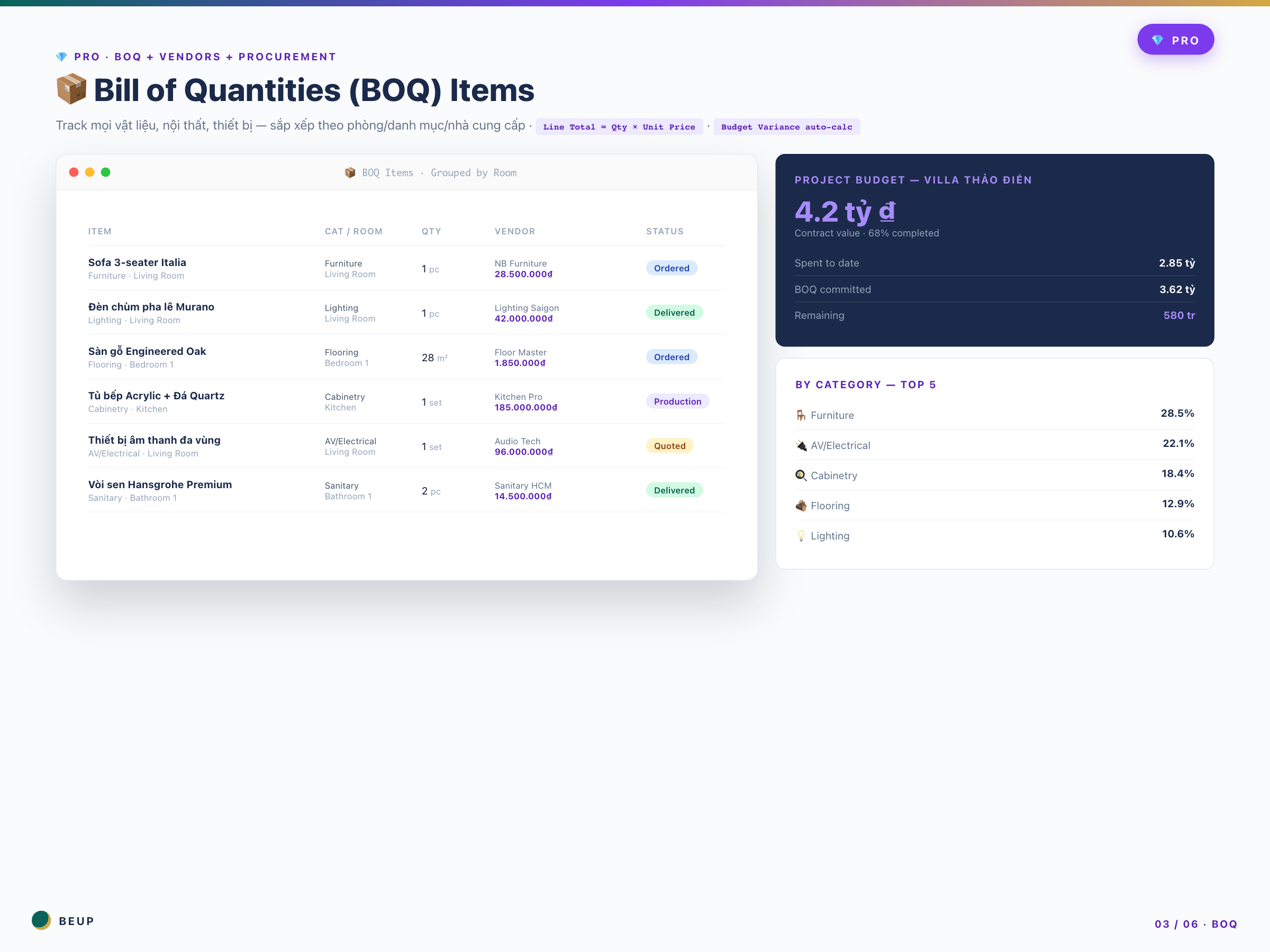
- 📦 BOQ Items — Line Total, Approved By + Approval Date (Pro-only), By Category view.
- 🏪 Vendors — Payment Terms, Tax Code, 10 categories (Pro), credit limit tracking.
- 📋 Procurement — PO Number (Pro), Payment Terms view, By Payment Terms grouped.
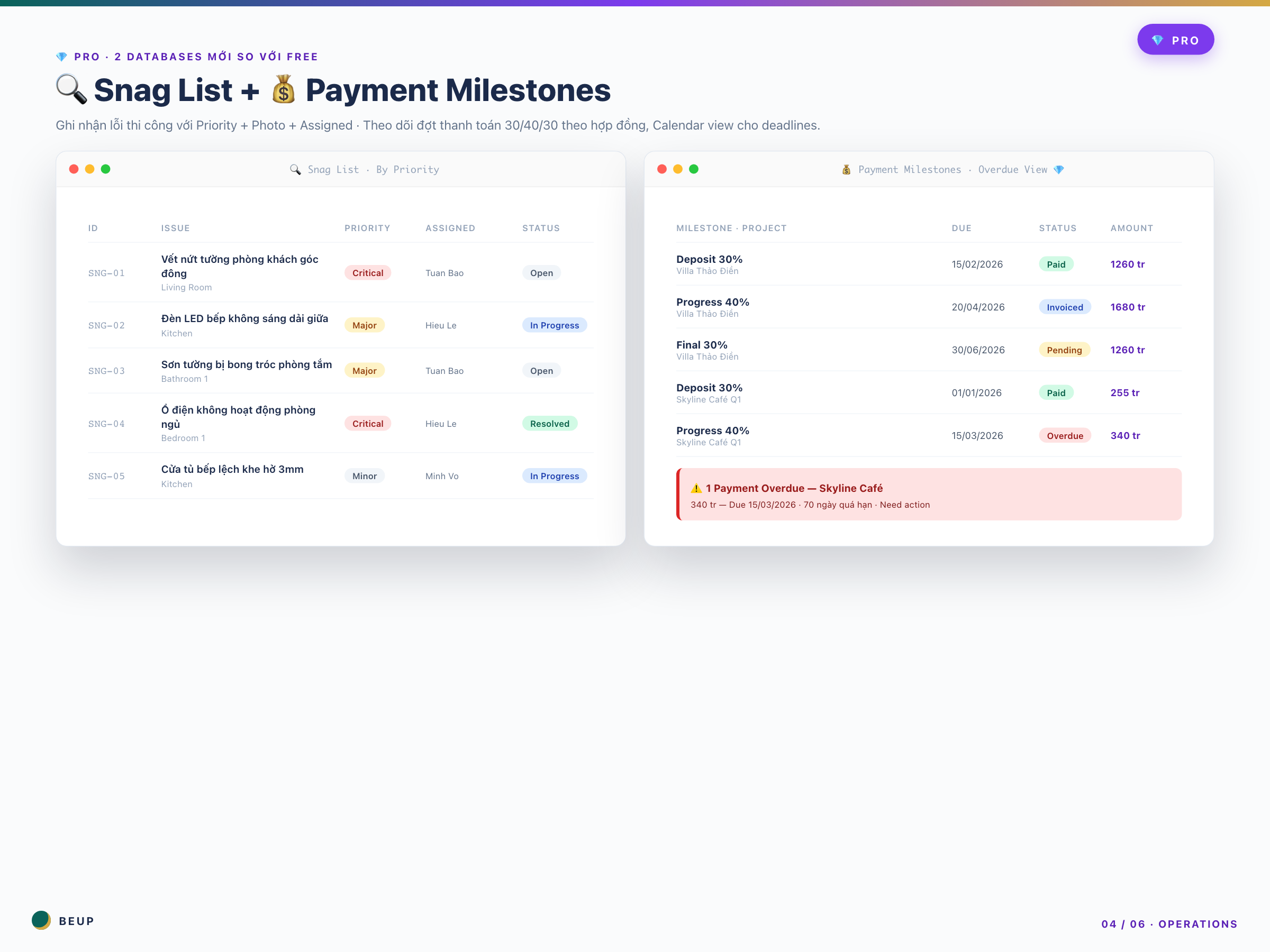
- 🔍 Snag List — Resolution Date column (Pro), Overdue view automatically flags snags not fixed after N days.
- 💰 Payment Milestones — Payment Method (Bank/Cash/Check), Received Date, Overdue Payments view.
- 🔄 Change Orders ⭐ Pro-only — Impact Cost, Impact Schedule, Approval status, audit trail.
- 📝 Daily Site Reports ⭐ Pro-only — Weather, Workers, Issues, Photos, Calendar view.
- 📄 Document Register ⭐ Pro-only — Revision history, Latest Revisions filter, document categories.
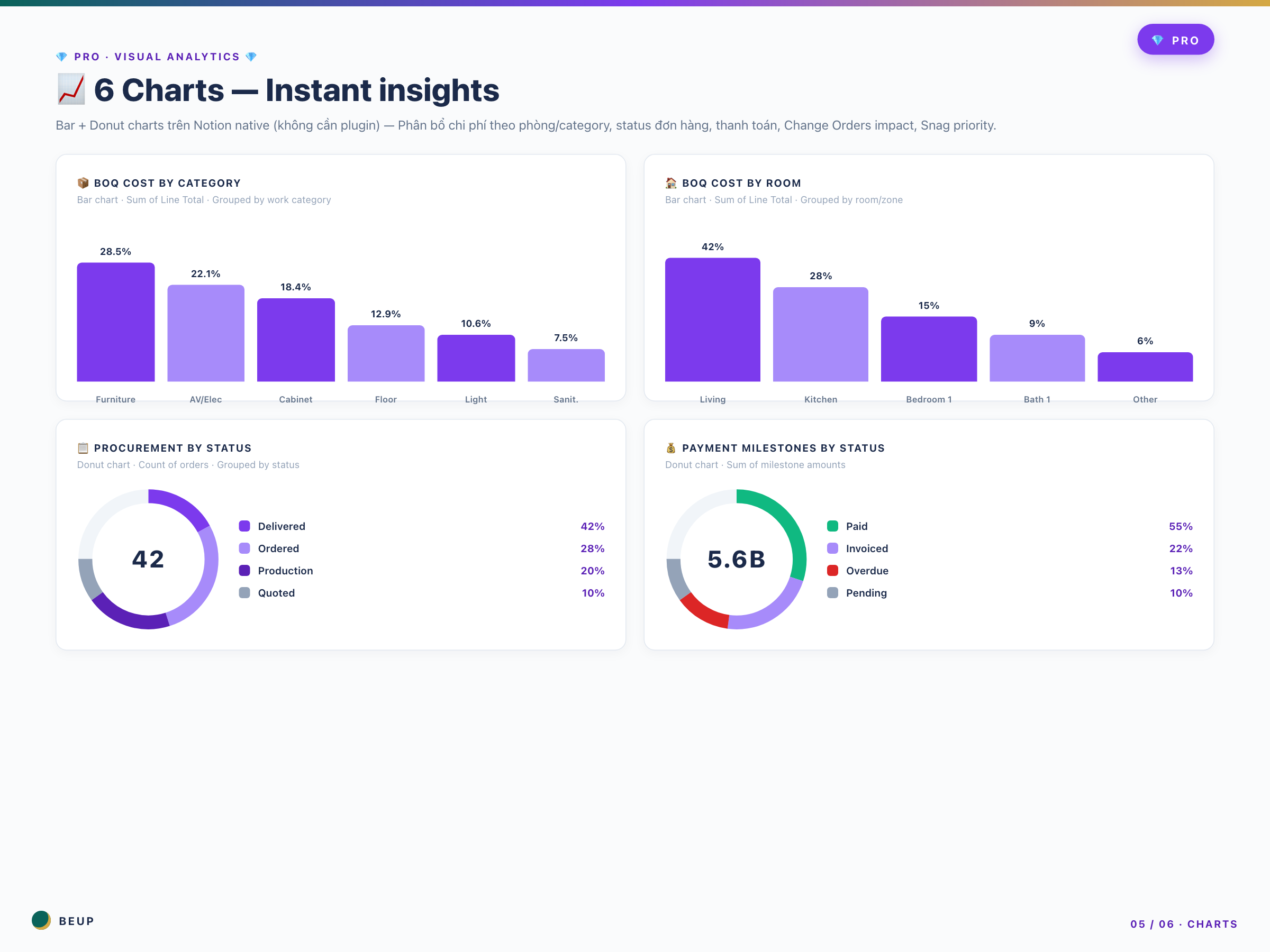
6 visual charts: 4 Lite charts + Change Orders by Impact + Snag List by Priority. Bar + Donut + Stacked.
WHO IS THIS FOR?
Furniture company / general contractor — You're using Asana + Google Sheets + WhatsApp + email. Each tool has a different source of truth. The PM asks for info, you search 4 places. Trial-and-error for many years. Pro gathers everything in 1 workspace.
Project Manager senior — You're managing 5+ projects simultaneously. You've experienced customers complaining due to lack of evidence, suppliers cheating due to no audit trail, and change order disputes due to no signed approval. You know the real value of Document Register + Change Orders.
Director / Co-founder — You don't want to spend 2 hours each week in meetings listening to team reports. You want to open the Portfolio dashboard for 5 minutes in the morning, grasp the situation, and work on strategic tasks.
Foreman / Site Supervisor — Bạn ghi Daily Site Report mỗi tối qua mobile. Khách hỏi 5 năm sau “ngày X có lỗi không?” — bạn mở ra, có ngay.
QS senior — Bạn xử lý PO Number, Payment Terms (NET 30/60), credit limit với NCC. Bạn cần view “By Payment Terms” để hôm nay đòi đúng những đơn NET 30 đến hạn.
Suitable size: 5-15 projects simultaneously · budget 5-50 billion/project · team has at least 1 dedicated PM.
Not suitable if: You're freelancing 1-2 projects (Free is enough — save 499k). Studio with 3-5 projects without a dedicated PM team (Lite 199k is enough — save 300k and avoid feature overload).
WHAT'S INCLUDED?
- 1 Notion Pro workspace with 9 linked databases (Lite 6 + Change Orders + Daily Reports + Document Register)
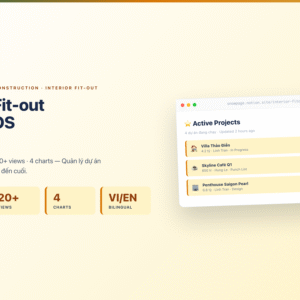
- 30+ available views — including multi-project Portfolio Overview
- 6 native Notion charts (Bar + Donut + Stacked) — no plugin needed
- Budget Variance + Contract Value + Completion % formulas have been setup
- Approval workflow logic trong Change Orders
- Document revision tracking + “Latest Revisions” filter
- Rich sample data: 4 projects (including Penthouse Saigon Pearl), full sample data 9 databases
- Pro hub page with Portfolio Overview + Operations Tracker + Visual Analytics
- Comprehensive User Guide — TLDR for each database + detailed toggle 9 DB
- Bilingual: property names in English, instructions in Vietnamese
REALISTIC WORKFLOW — Typical week with Pro
- Monday 7am: Open Portfolio Overview. 5 minutes to grasp the situation of 7 projects. Identify 2 projects to focus on this week.
- Monday 8am: Mở “Overdue Payments” → 2 đơn quá hạn từ Skyline Café (340 tr). Gửi reminder qua email + Zalo cho khách.
- Monday 9am: Team meeting. Open Visual Analytics share screen — 30 seconds to review BOQ Cost by Category, Procurement by Status. Team focuses correctly.
- Monday 2pm: Visit Villa Thảo Điền site. Discover 3 new errors → record Snag List + photo on Notion mobile. Foreman records Daily Report at the end of the day.
- Wednesday: Penthouse client requests to replace marble flooring → create Change Order CO-008. Impact +120 tr, +7 days. Send link to client for approval. Complete audit trail.
- Last Friday of the month: Director holds monthly summary meeting. You share Portfolio dashboard — Contract Value 24.3 billion (↑18%), Avg Completion 53.7%, 2 Overdue Payments resolved. Director is satisfied — no need for PowerPoint slides.
- Handover of Skyline Café: Open Snag List → 8 Critical snags have been Resolved. Open Document Register → Rev D final drawing. Open Daily Reports → 90-day construction evidence. Customer signs handover confidently.
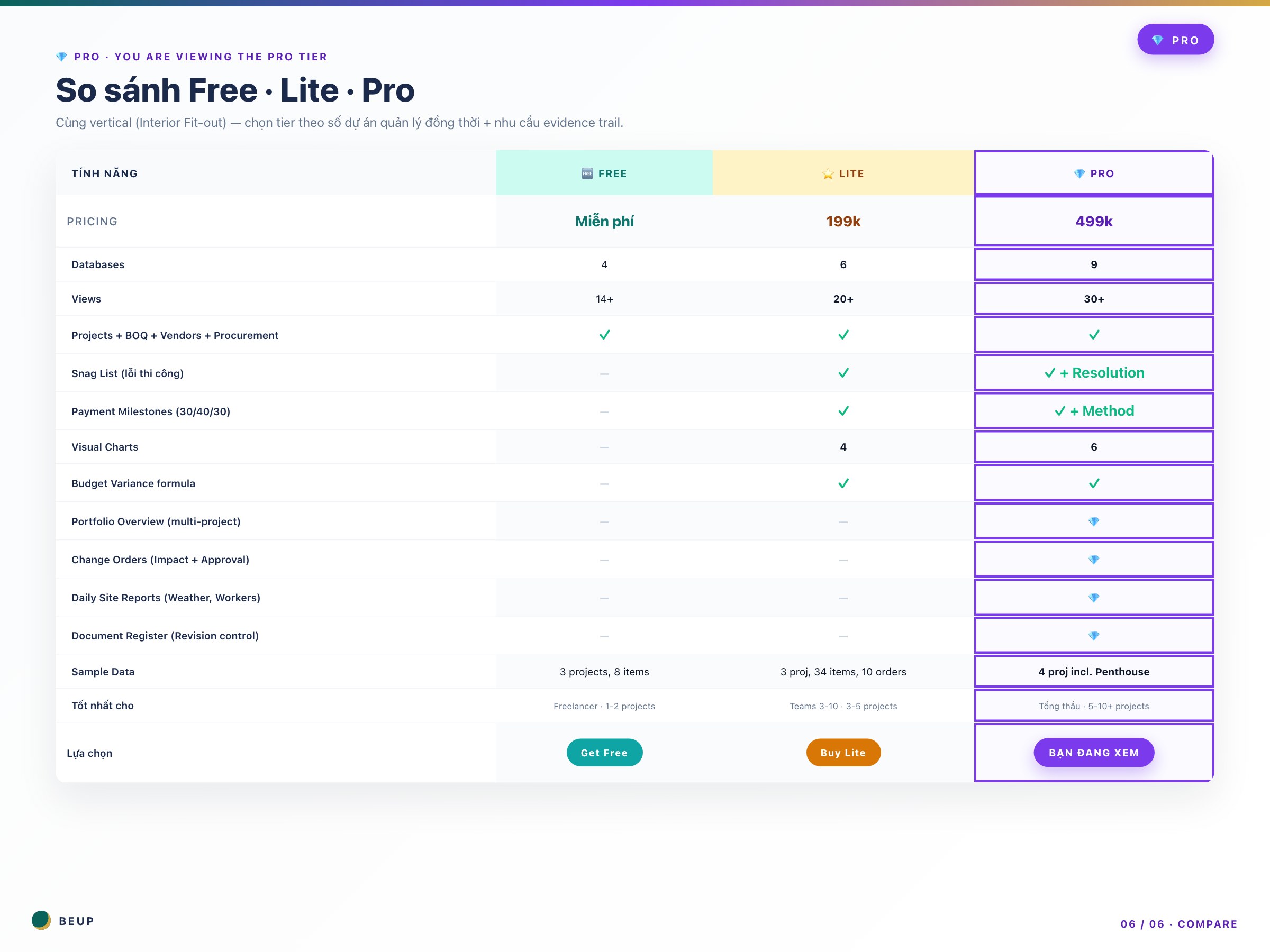
COMPARE FREE vs LITE vs PRO
| Your question | 🆓 Free | ⭐ Lite | 💎 Pro (this) |
|---|---|---|---|
| “7 dự án 1 màn hình tổng quan” | — | — | ✓ Portfolio |
| “Change Order có approval ký số” | — | Track qua BOQ | ✓ Workflow |
| “Evidence trail nếu khách kiện” | — | — | ✓ Daily Reports |
| “Revision control bản vẽ” | — | — | ✓ Doc Register |
| “Track Snag List với Overdue” | — | Basic | ✓ + Resolution Date |
| “PO Number + Payment Terms NET 30” | — | — | ✓ |
| “Track 3-5 dự án nhỏ” | It's okay | ✓ Correct tier | A bit too much |
| “Track 1-2 dự án freelance” | ✓ Enough | Fee | Overpriced |
Đang cân nhắc Lite vs Pro? 3 câu test nhanh:
- Bạn quản lý 5+ dự án đồng thời? (Yes → Pro)
- Có Project Manager riêng cho từng nhóm dự án? (Yes → Pro)
- Đã từng bị khách kiện hoặc cần evidence pháp lý? (Yes → Pro chắc chắn)
Nếu trả lời “Không” 3/3 — Lite 199k đủ rồi. Tiết kiệm 300k. Xem Lite →
SYSTEM REQUIREMENTS
- Minimum: Notion account (Free plan đủ — không cần Plus). Chrome/Edge/Safari/Firefox bản mới.
- Recommended: Notion desktop app + mobile app cho cả team. Mỗi PM 1 account riêng để có audit trail rõ ràng.
- No need for: Asana / Monday.com / Trello song song. Pro thay thế hoàn toàn các tool này cho interior fit-out workflow.
CÂU HỎI HAY ĐƯỢC HỎI
Mình đang dùng Lite, có nên nâng cấp lên Pro không?
3 dấu hiệu nên lên Pro: (1) Bạn quản lý 5+ dự án và mỗi sáng mất 30+ phút để tổng hợp tình hình. (2) Khách bắt đầu yêu cầu Change Orders chính thức với approval ký số. (3) Bạn từng cần Daily Site Reports làm evidence (khách kiện hoặc bảo hiểm).
Change Orders khác Variation Orders trong BOQ thế nào?
Variation Order (trong BOQ) = thay đổi scope vật tư cụ thể (thêm 2 ghế, đổi loại đèn). Không cần approval chính thức. Change Order (database riêng) = thay đổi lớn cần ký kết: thay layout, thêm phòng, đổi vật liệu toàn bộ. Có Impact Cost + Impact Schedule + Approval workflow + audit trail.
Daily Site Reports có bắt buộc ghi mỗi ngày không?
Khuyến khích ghi hàng ngày — đặc biệt khi có Issues. Tối thiểu nên ghi: ngày bắt đầu, ngày bàn giao, các milestones quan trọng, các Issues xảy ra. Cuối project bạn có 30-90 reports — đủ làm evidence trong nhiều năm.
Document Register dùng cho team hay chỉ admin?
Toàn team. Designer upload bản vẽ Rev D mới → engineer mở thấy ngay (chứ không gửi qua email). Site supervisor cần permit → vào Document Register filter Type=”Permit” → có ngay PDF. QS cần BOQ approved final → filter Type=”BOQ-Approved” + Latest Revisions.
9 databases có quá nhiều không? Team mới có bị quá tải?
Có chút overhead onboarding ban đầu (2-3 ngày). Nhưng so với việc dùng 5 tool riêng biệt, 9 databases trong 1 workspace dễ học hơn nhiều. User Guide chi tiết từng DB. Sau 1 tuần team sẽ vận hành smooth.
Bao gồm support / consult không?
Không. Đây là template digital, không có support trực tiếp. Nhưng có User Guide đầy đủ + sample data đa dạng + community Notion forum public.
Notion Free plan có hạn chế gì cho 9 databases không?
Không có hạn chế. Notion Free cho phép unlimited databases + unlimited pages cho personal use. Hạn chế chỉ là: không có file upload > 5MB (workaround: link Google Drive), không có advanced permissions (workaround: dùng Sharing settings standard). Đủ cho 95% interior fit-out workflow.
Only logged in customers who have purchased this product may leave a review.
Related products
- Buy Now This product has multiple variants. The options may be chosen on the product page

A Digital Asset Ecosystem and Work Operating System for Individuals & Teams
SUPPORT
Copyright © 2026 BEUP Learning Solutions
MST: 3301755602
Reviews
There are no reviews yet.