No products in the cart.



Fleet Management & Trip Efficiency
799.000 VND From 499.000 VND
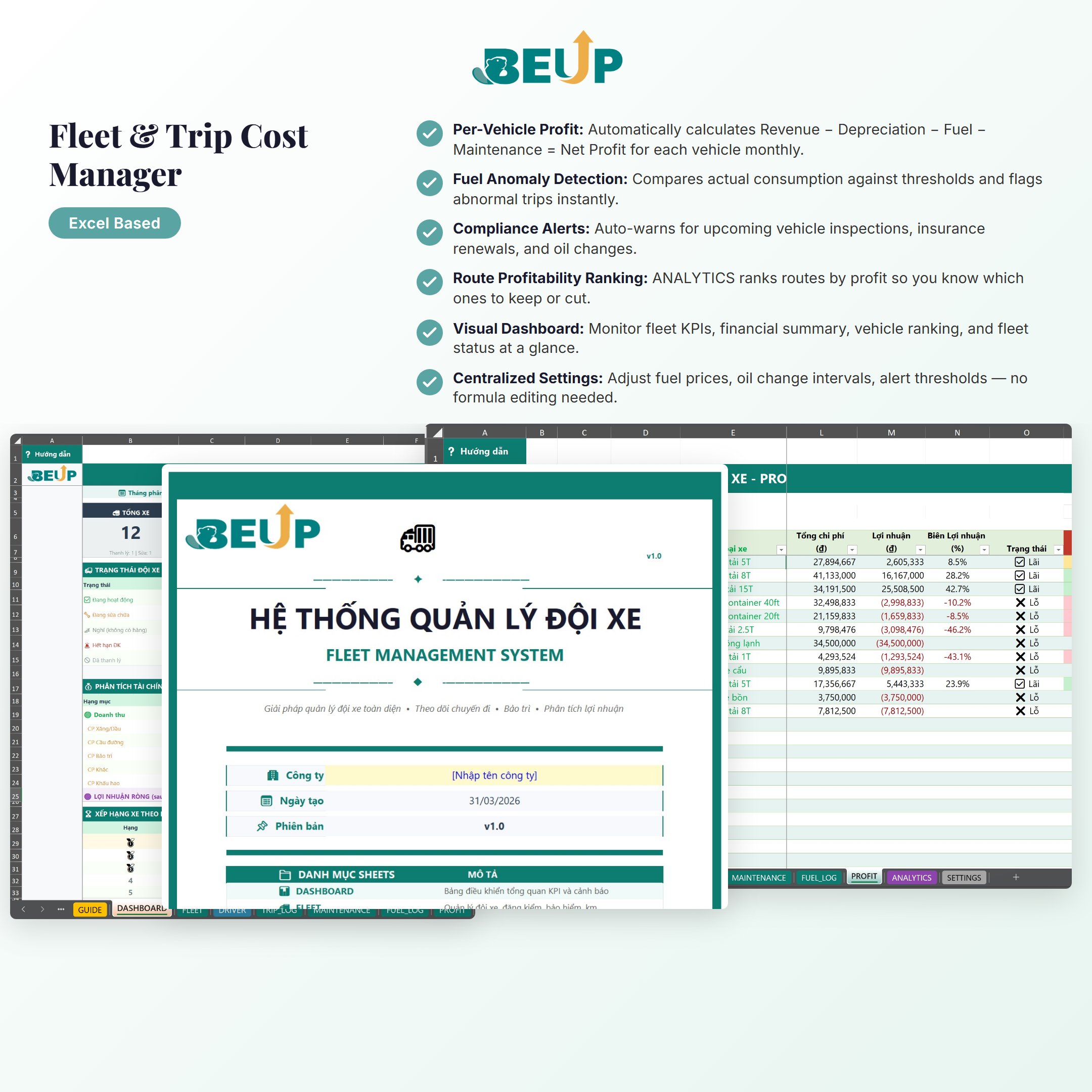
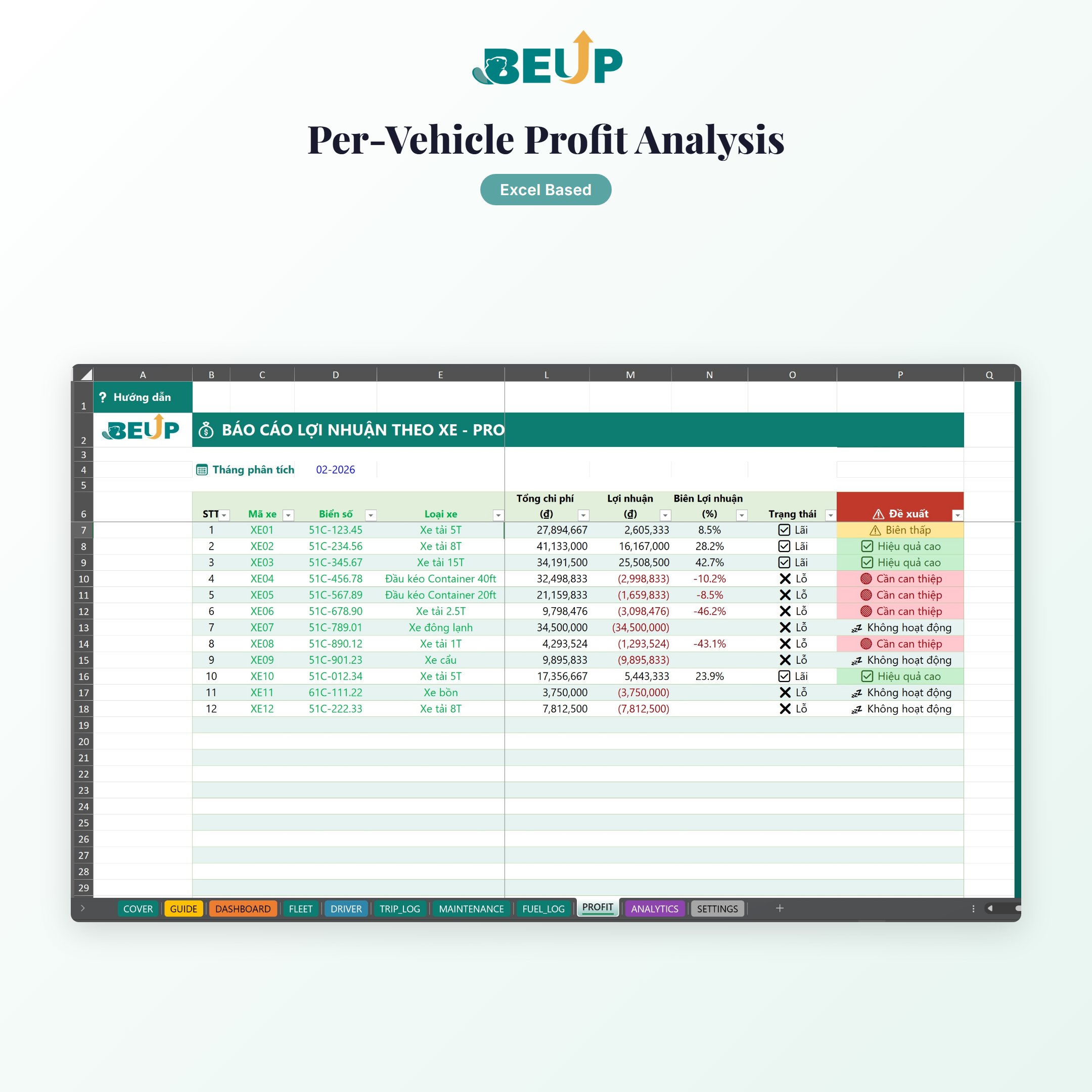
Professional Excel file for small transportation businesses — track per-vehicle costs, analyze trip profit/loss, detect fuel anomalies, automatic registration & insurance alerts. 11 linked sheets, ready to use with no complex setup.
Sold: 0 items
Fleet Management & Trip Efficiency — Control costs per vehicle, per trip — instantly know which vehicle is profitable and which route is losing money, using just Excel.
Are you managing your fleet with notebooks or self-made Excel files? Don't know exactly which vehicle is profitable and which is “eating” into your profits? Can't track actual fuel consumption per trip? This system covers everything: from vehicle registration, trip logging, maintenance & fuel tracking, to per-vehicle profit/loss analysis and an overview dashboard.
KEY FEATURES (11 sheets)
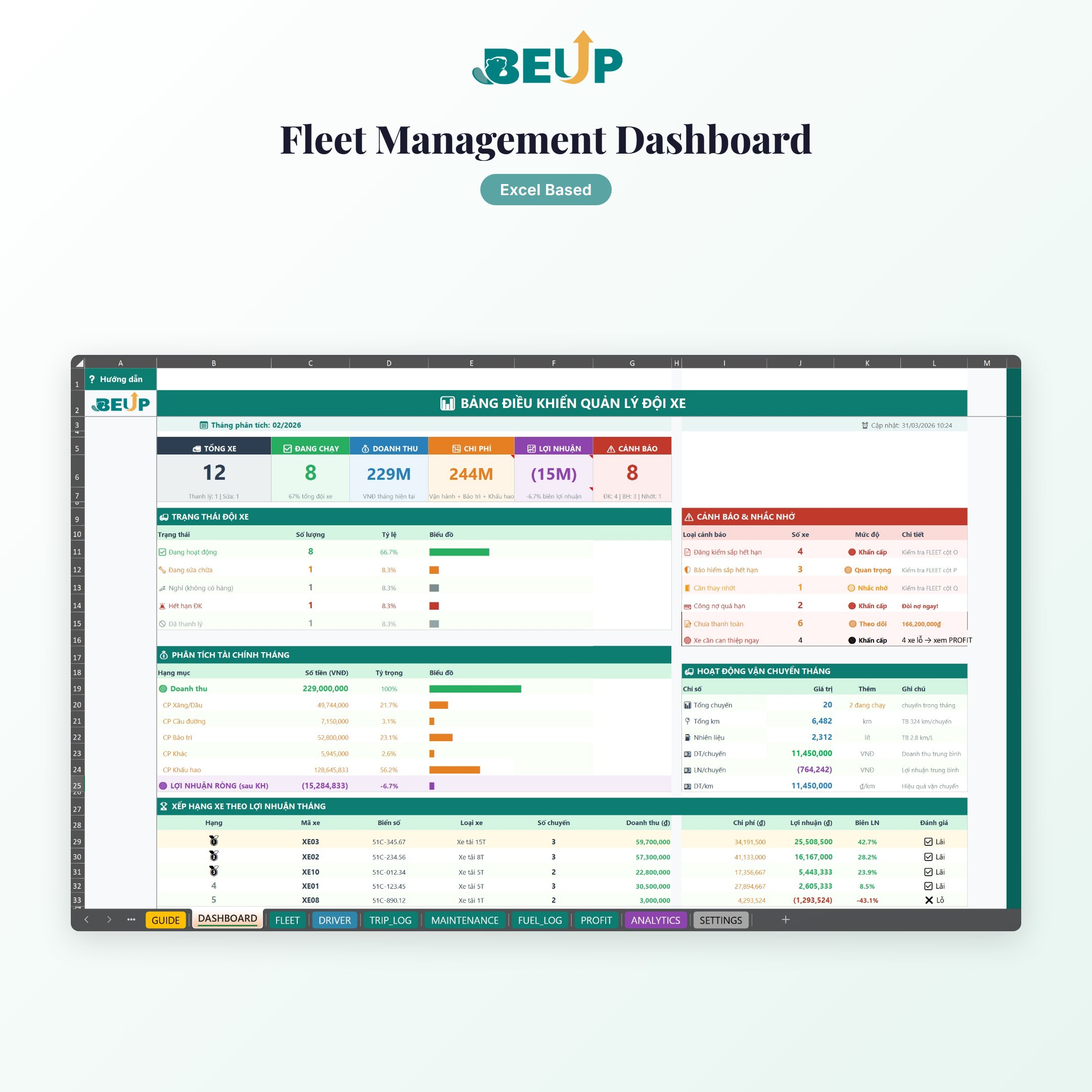
- DASHBOARD — KPI overview: revenue, costs, fleet net profit, text charts compatible with all Excel versions & Google Sheets.
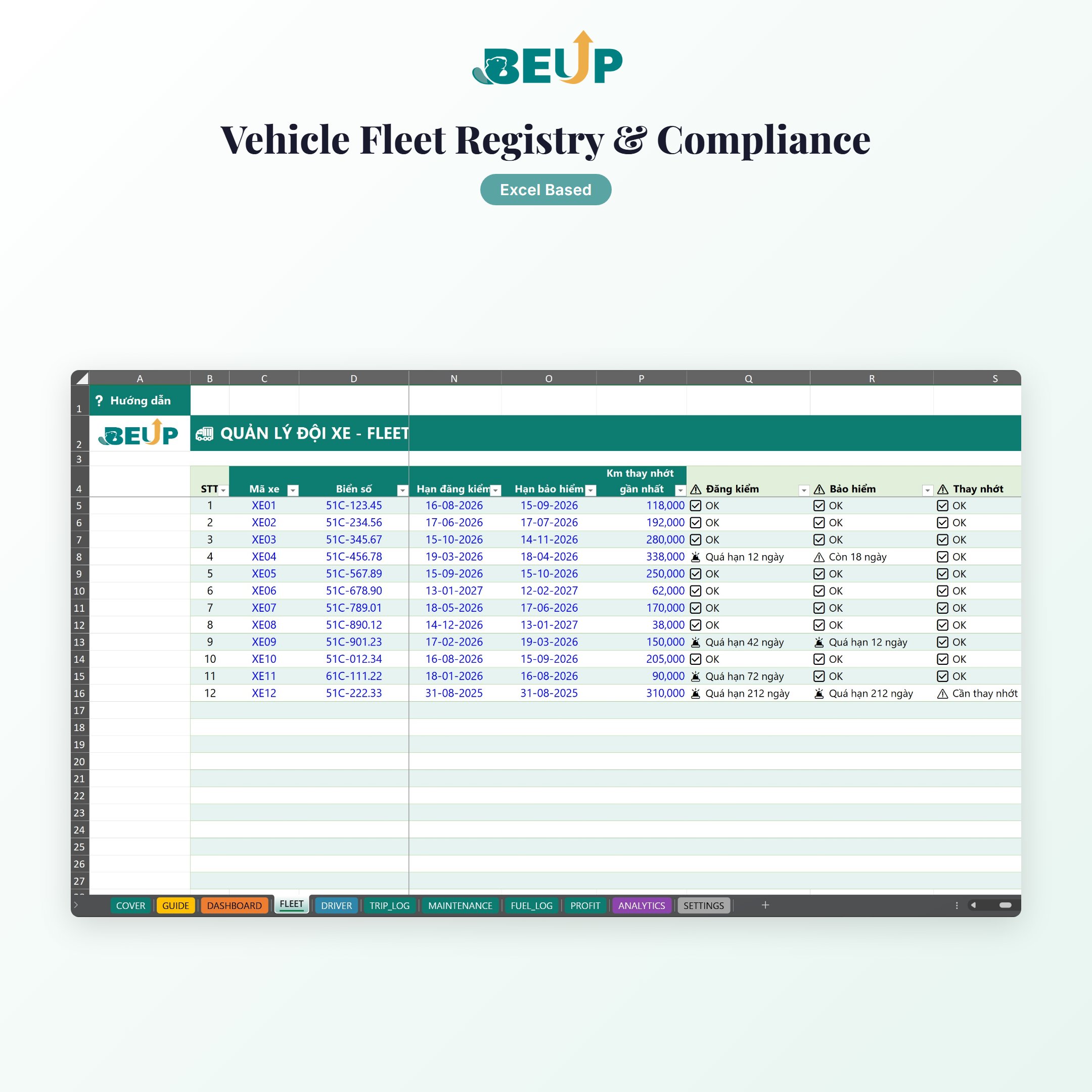
- FLEET — Register and manage vehicle information: vehicle type, license plate, purchase price, depreciation, automatic registration ✅/⚠️/🚨 and insurance alerts.
- DRIVER — Driver list linked to vehicles, assignment tracking.
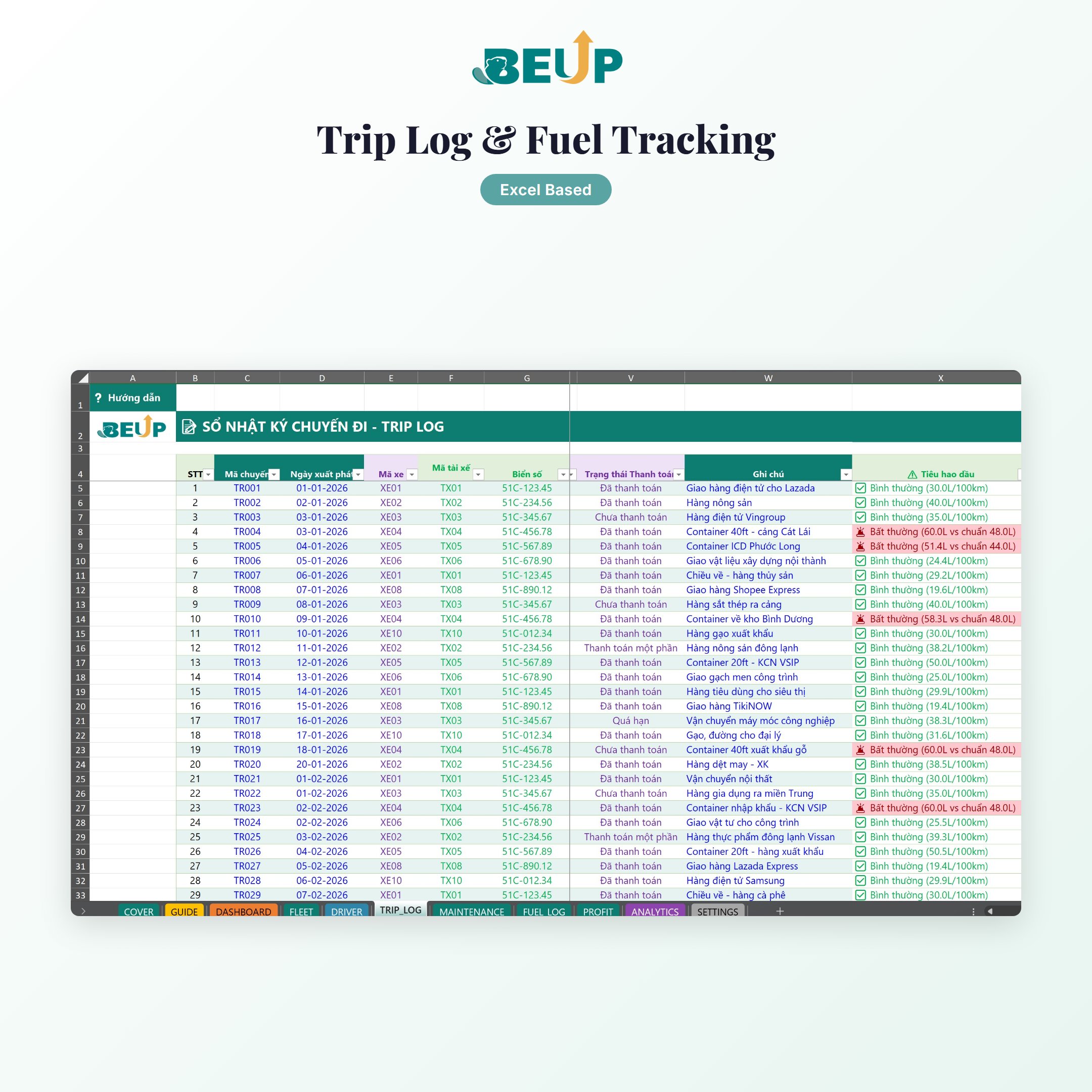
- TRIP_LOG — Record each trip: route, km, revenue, fuel consumed, payment status, automatic fuel anomaly detection.
- MAINTENANCE — Maintenance history: oil changes, tire replacements, repairs — track costs and tire positions.
- FUEL_LOG — Fuel costs: fill-up date, liters, unit price, fuel type (Diesel/Gasoline), total cost auto-calculated.
- PROFIT — Net profit/loss per vehicle by month: Revenue − Depreciation − Fuel − Maintenance = Net Profit.
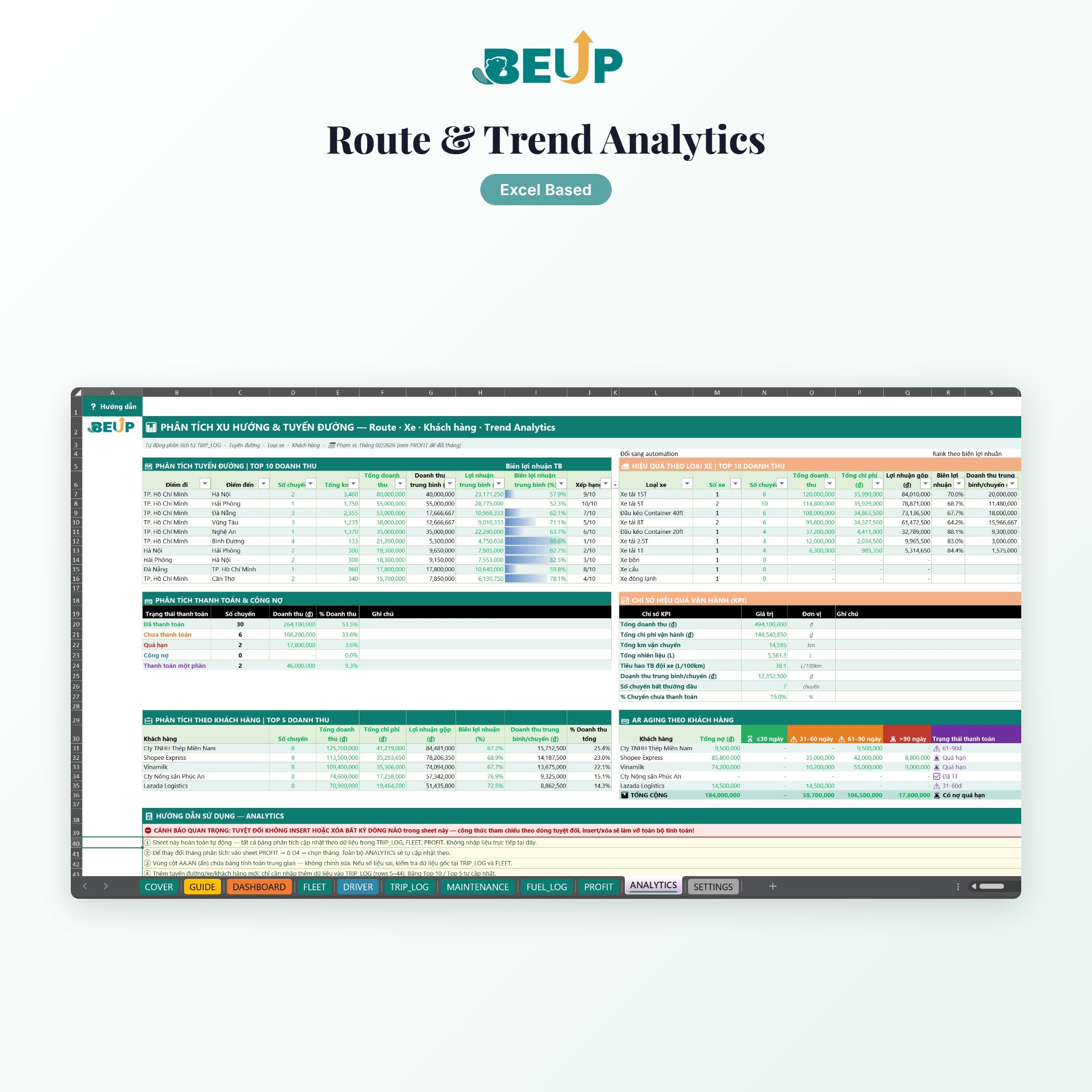
- ANALYTICS — Profit ranking by route, monthly trends, fleet utilization efficiency.
- SETTINGS — All threshold settings centralized: fuel prices, oil change intervals (km), registration alert thresholds (days), depreciation rates.
Design: Structured Tables (tblFleet, tblTrip, tblMaintenance, tblFuel…) auto-extend when adding rows. 14+ Named Ranges for easy auditing. Text charts compatible with Google Sheets.
WHO IS THIS FOR?
- Small transportation business owners (5–50 vehicles) — currently managing a fleet with notebooks or self-made Excel files, unable to track actual costs per vehicle.
- Delivery/logistics fleet managers — need monthly cost-revenue reports for management but lack a dedicated tool.
- Vehicle rental owners or transportation cooperatives — want to track efficiency per vehicle, detect fuel fraud, and plan proactive maintenance.
Scale: Suitable for fleets of 5 to 50 vehicles. No limit on the number of trips.
WHAT'S INCLUDED?
- 2 Excel files — a Template version (blank, ready to use) and a Sample version (sample data for a 12-vehicle fleet, 40 trips)
- Both versions include bilingual Vietnamese & English editions
- 11 specialized sheets: COVER · GUIDE · DASHBOARD · FLEET · DRIVER · TRIP_LOG · MAINTENANCE · FUEL_LOG · PROFIT · ANALYTICS · SETTINGS
- GUIDE with detailed step-by-step instructions for each sheet
- Pre-built formulas with automatic cross-sheet linking
- Structured Tables auto-extend — add rows without dragging formulas
- 14+ Named Ranges — transparent and easy to audit
HOW IT WORKS
- One-time setup: Open SETTINGS to enter fuel prices, oil change intervals, alert thresholds. Open FLEET to register your vehicle list with license plates, vehicle type, and purchase date.
- Daily data entry: Record trips in TRIP_LOG (route, km, revenue, fuel). Update FUEL_LOG when refueling. Log repairs in MAINTENANCE.
- Track on Dashboard: Open DASHBOARD for an overview: revenue vs costs, most/least profitable vehicles, most efficient routes. Select a month in PROFIT to drill down into net profit per vehicle.
COMPARE WITH OTHER SOLUTIONS
| Criteria | BEUP Template | Fleet management software | DIY Excel File |
|---|---|---|---|
| Cost | ✓ One-time 499K | ✗ $20–50/vehicle/month | ✓ Free |
| Profit/loss per vehicle | ✓ Automatic | ✓ Yes | ✗ Manual calculation |
| Fuel fraud detection | ✓ Fuel anomaly % | ~ Requires GPS | ✗ No |
| Registration/insurance expiry alerts | ✓ Automatic ✅⚠️🚨 | ✓ Yes | ✗ Mental tracking only |
| Route ranking | ✓ ANALYTICS | ~ Depends on plan | ✗ No |
| Works offline | ✓ 100% Excel | ✗ Requires internet | ✓ Yes |
| Deployment time | ✓ 15 minutes | ✗ 1–4 weeks | ~ Build it yourself |
SYSTEM REQUIREMENTS
- Minimum: Microsoft Excel 2016 or later
- Recommended: Microsoft 365 (latest formula updates)
- Google Sheets: Basic compatibility — the file uses INDEX/MATCH and text charts. Conditional formatting and some data validation may need manual adjustment
- No need for: Advanced Excel skills, VBA, or macros — just basic data entry is needed
FREQUENTLY ASKED QUESTIONS
Can I manage more than 12 vehicles?
Yes. Add new rows to the FLEET table — Structured Tables auto-extend formulas. No limit on the number of vehicles.
How does the system detect fuel fraud?
TRIP_LOG automatically calculates actual fuel consumption (liters/km) and compares it against the threshold in SETTINGS. When exceeded, the alert column displays the percentage deviation for further investigation.
Does the file work on Google Sheets?
Basic compatibility. The file uses INDEX/MATCH and text charts, so most features work. Conditional formatting alerts and some dropdowns may need to be reconfigured.
I use both Diesel and Gasoline — can I track them separately?
Yes. SETTINGS allows you to set separate unit prices for Diesel and Gasoline. FUEL_LOG records the fuel type for each fill-up, and costs are automatically calculated based on the corresponding unit price.
Does the dashboard show monthly or all-time data?
PROFIT and ANALYTICS display data for the month you select (MonthSelected cell). Switch to any month to review historical data.
Be the first to review “Quản lý Đội xe & Hiệu quả Chuyến hàng” Cancel reply
Related products
- SaleSelect options This product has multiple variants. The options may be chosen on the product page
- SaleComprehensive Fabric Inventory Management – Stock, In/Out & Reporting | Excel Template0.00 out of 5
799.000 VNDFrom 499.000 VNDSelect options This product has multiple variants. The options may be chosen on the product page - SaleConstruction Cost Estimation & Cash Flow – Accurate Interior Budget Management | Excel Template0.00 out of 5
799.000 VNDFrom 499.000 VNDSelect options This product has multiple variants. The options may be chosen on the product page - SaleClassPilot – Language Center Operations Management | Excel Template0.00 out of 5
799.000 VNDFrom 499.000 VNDSelect options This product has multiple variants. The options may be chosen on the product page

A Digital Asset Ecosystem and Work Operating System for Individuals & Teams
SUPPORT
Copyright © 2026 BEUP Learning Solutions
MST: 3301755602
Reviews
There are no reviews yet.