No products in the cart.



Managing Multiple Airbnb Listings — Excel + Live Dashboard on BEUP Canvas
Price range: from 499.000 VND to 799.000 VND
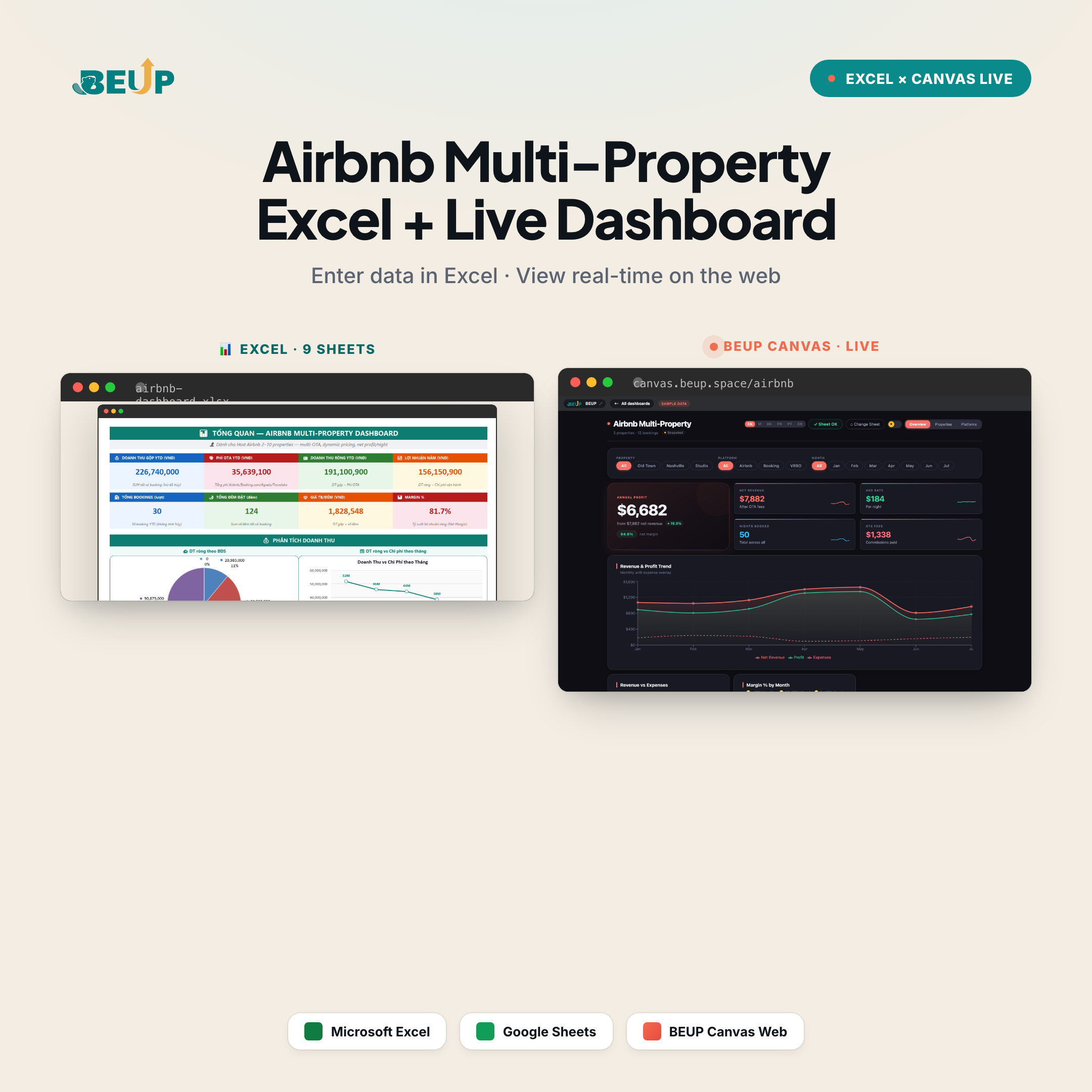
Dashboard Excel 9 sheets + Bảng điều khiển trực tiếp BEUP Canvas miễn phí for Airbnb hosts with 2–10 properties. Track occupancy, net revenue after OTA fees, operating costs per property, dynamic pricing log, and actual nightly profit. 5 platforms (Airbnb, Booking, Agoda, Traveloka, direct). Open online dashboard on your phone, share link with co-hosts, or use Excel offline — same data, two viewing options. Sample data and white-label version available. Accessible on Excel and Google Sheets.
Sold: 0 items
Bạn có 3–10 căn cho thuê ngắn hạn, listing trên Airbnb, Booking, Agoda, Traveloka và cả khách trực tiếp. Mỗi tháng giá thay đổi, OTA fee khác nhau, chi phí dọn dẹp / bảo trì rải rác — đến cuối tháng chỉ biết “tổng thu” còn căn nào thực sự lời, căn nào lỗ thì không rõ. Bộ này trả lời câu hỏi đó cho per property, per platform, per month — using only Excel formulas, no macros, no add-ins required.
🆕 FREE LIVE DASHBOARD — BEUP CANVAS
With this template, you have additional free lifetime access to BEUP Canvas — turn your Excel or Google Sheets file into an interactive online dashboard in 30 seconds.
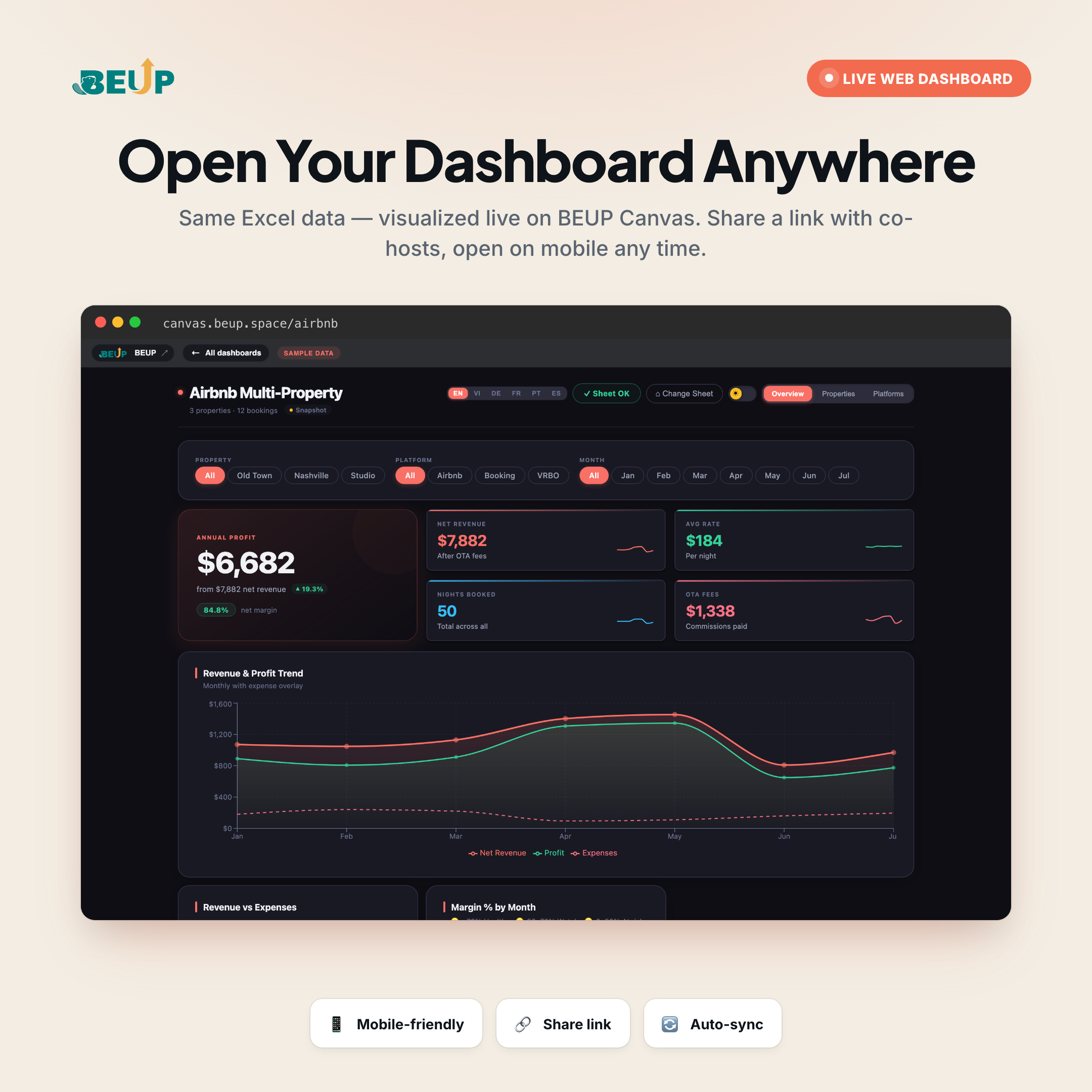
- Open it now: canvas.beup.space/airbnb
- How it works: upload Excel file (.xlsx) or paste Google Sheets link → Canvas renders dashboard with interactive filters, real-time charts
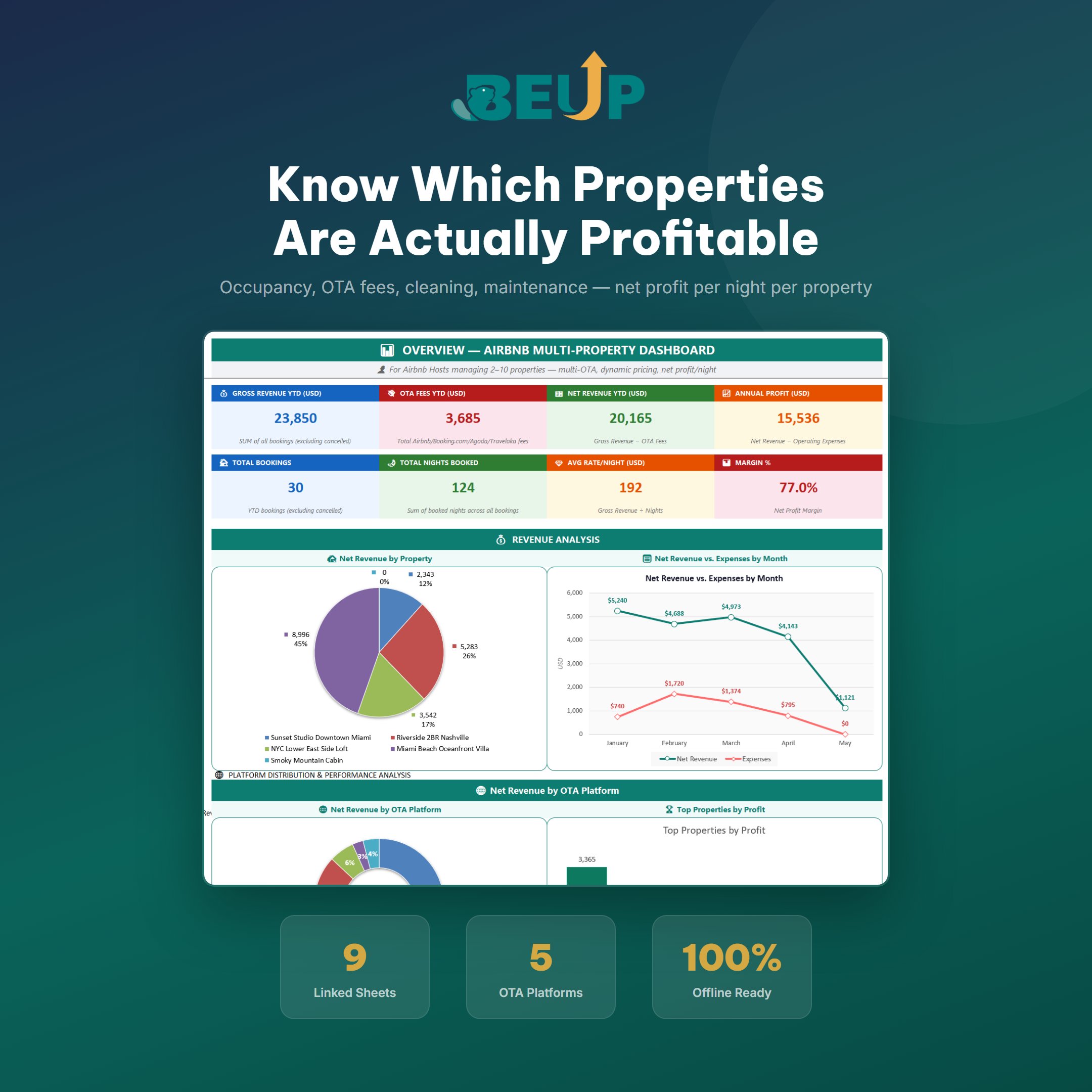
- Features: filter theo căn / nền tảng / tháng, KPI cards (Annual Profit, Net Revenue, Avg Rate/Night, Nights Booked, OTA Fees), biểu đồ Revenue & Profit trend, Revenue vs Expenses, Margin %/tháng — share link cho đồng host, xem trên điện thoại không cần Excel app
- Privacy: Canvas runs entirely on your browser — data is NOT stored on BEUP server
- Auto-sync: each time you update Google Sheets, the dashboard updates automatically
Included in the template price (no extra charge). This is BEUP's exclusive USP — other templates only sell Excel files, BEUP gives you a live dashboard for free.
9 PAGES OF CALCULATIONS — A COMPLETE SYSTEM
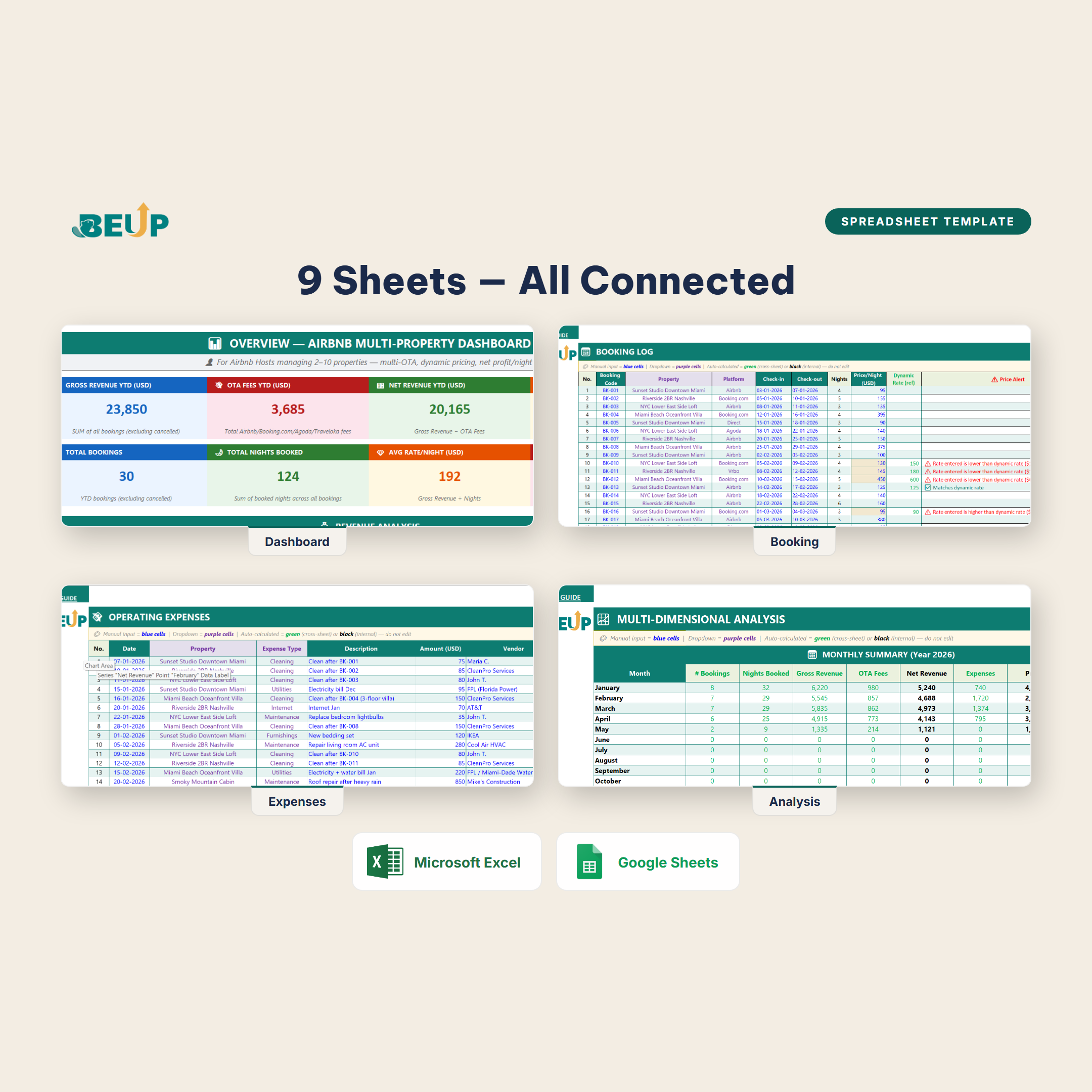
- Overview (Dashboard) — 8 KPI cards: Gross Revenue YTD, OTA Fees YTD, Net Revenue YTD, Annual Profit, Total Bookings, Total Nights Booked, Average Price/Night, Margin %. Revenue analysis by Property (pie chart) and Revenue vs Expenses by Month (line chart). All auto-filtered by Month and Property.
- Properties — List of individual properties (property code, address, number of rooms, fixed monthly costs, start date of rental). Supports 2–10 properties comfortably.
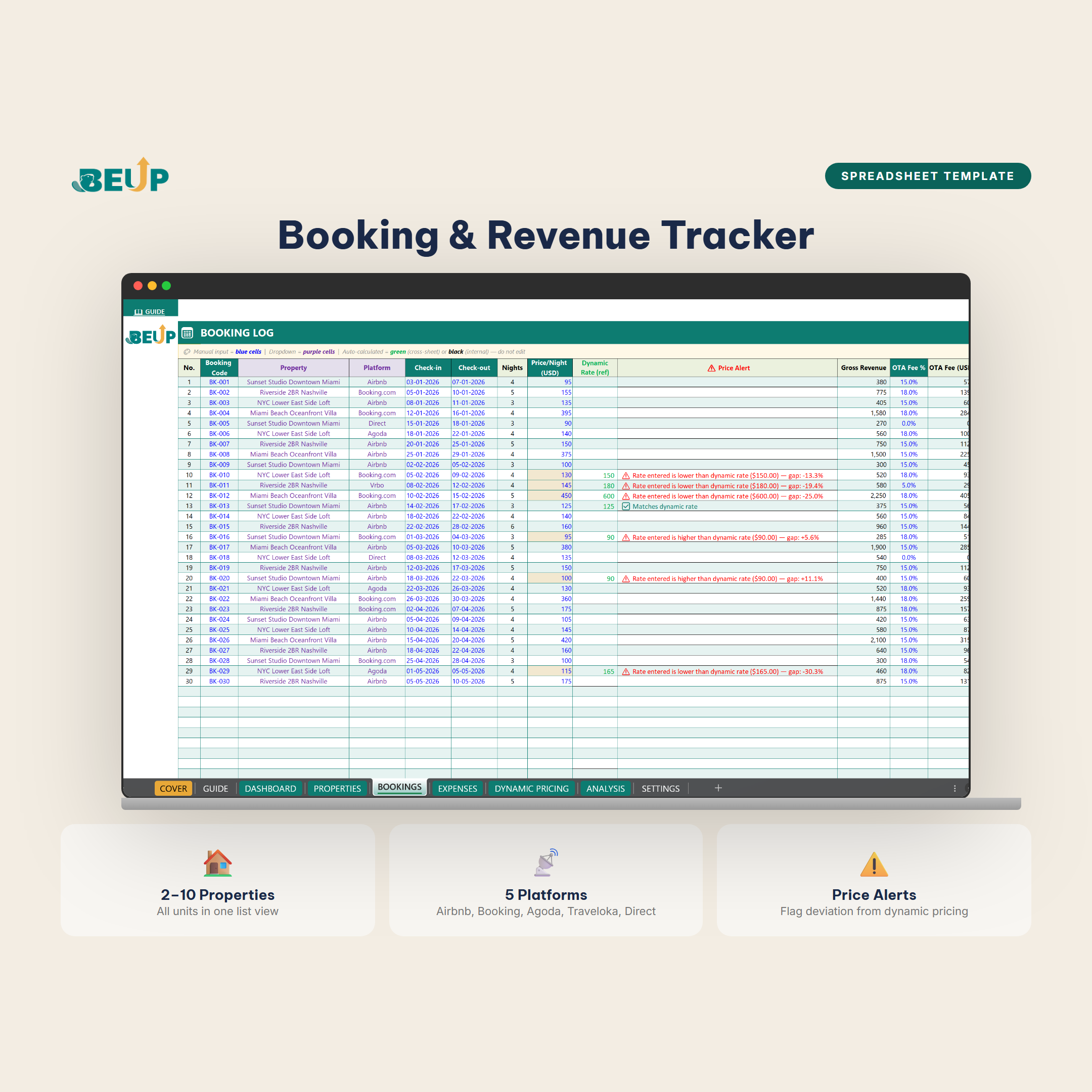
- Booking — Booking book. Enter Date · Platform · Property Code · Guest · Nights · Price/night · OTA fee — calculate net revenue, night, average price. Alert for abnormal low/high price (flag price deviation from dynamic price).
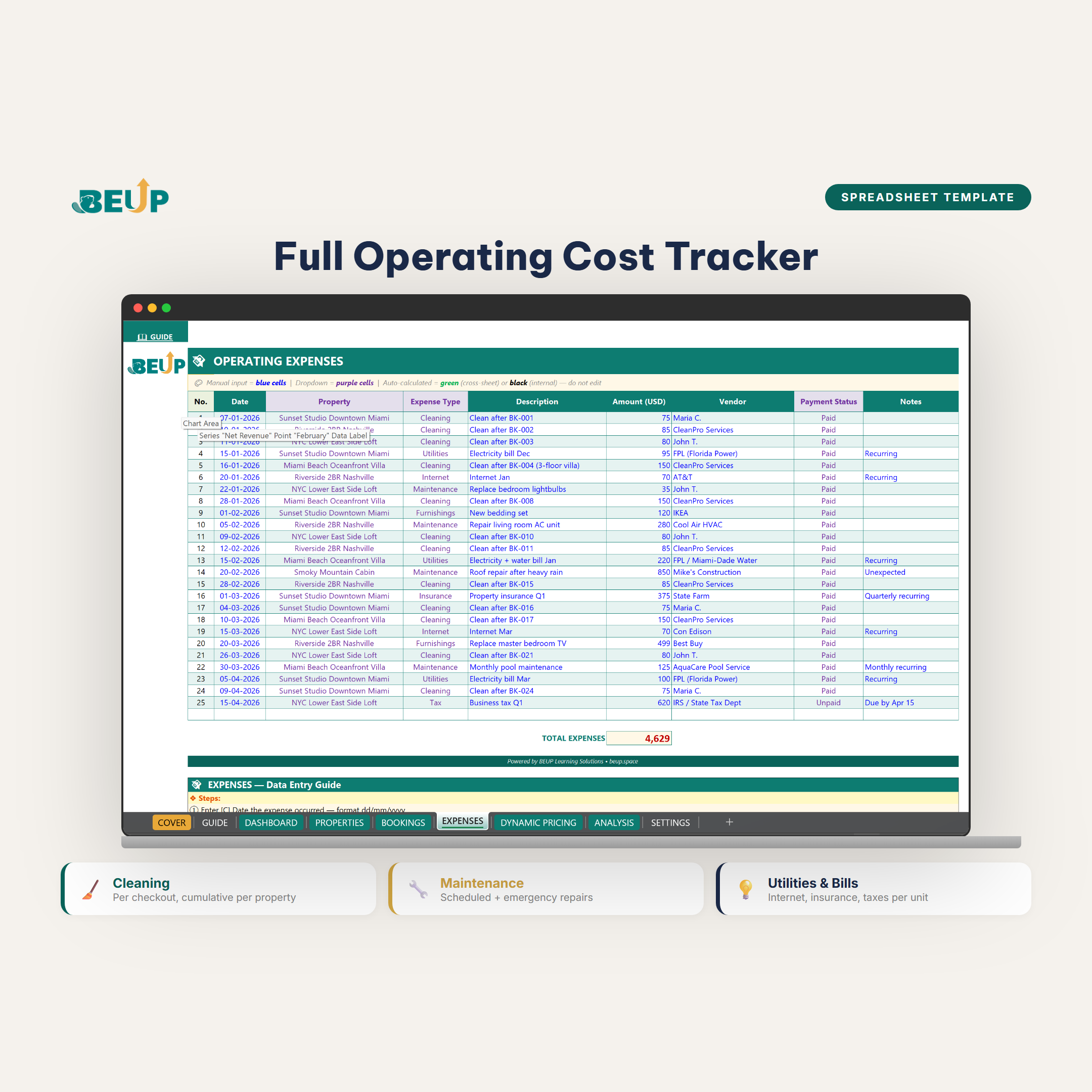
- Chi Phí Vận Hành — Lau dọn, bảo trì, tiện ích (internet, điện nước), bảo hiểm, thuế — phân loại theo nhóm và phân bổ về từng căn.
- Dynamic Pricing — Log mỗi lần đổi giá theo mùa / nền tảng / sự kiện. Tự tính giá đề xuất dựa trên lịch sử và occupancy mục tiêu.
- Analysis — Bảng lãi/lỗ chi tiết cho từng căn, doanh thu theo nền tảng, occupancy %, RevPAR (revenue per available room), xếp hạng tự động Mở Rộng · Duy Trì · Đánh Giá Lại.
- Nền Tảng — Cài đặt phí OTA cho 5 nền tảng mặc định (Airbnb 14%, Booking 15%, Agoda 17%, Traveloka 15%, Direct 0%) — chỉnh được theo deal riêng của bạn với từng OTA.
- Settings — Danh mục chi phí, dropdown cho căn / nền tảng / loại booking, cấu hình hệ thống — thiết lập một lần.
- User Guide — 8 bước nhập liệu, quy ước màu sắc, hướng dẫn từng sheet, mẹo tối ưu pricing.
WHO IS THIS FOR?
- Host Airbnb / Booking 2–10 căn — đang chạy đa platform và cần biết căn nào thực sự sinh lời sau khi trừ OTA fee, chi phí vận hành.
- Chủ đầu tư shorterm-rental — cần theo dõi P&L từng căn để quyết định mở rộng portfolio, giữ lại căn nào, thanh lý căn nào.
- Đồng host hoặc co-host — muốn share dashboard cho team / partner mà không gửi file Excel qua lại.
- Người dùng nhiều platform OTA — Airbnb, Booking, Agoda, Traveloka cùng lúc và muốn thấy doanh thu thực sau fee, không bị lừa bởi “tổng doanh thu” mà OTA hiển thị.
- Host mới chuyển từ 1 căn sang nhiều căn — needing a standardized financial framework from the start rather than building separate spreadsheets.
Bộ công cụ đã được kiểm thử với 30+ bookings/tháng, 5 căn và 4 platform OTA đồng thời mà không bị chậm. Phù hợp cho cả người dùng Excel trên máy tính và Google Sheets trên đám mây.
WHAT'S INCLUDED?
Each time you download, you receive 4 deliverables — organized in a format for use on any device:
Excel (.xlsx) — 2 files to download:
- Template — a blank version for you to enter real data
- Sample — có sẵn dữ liệu mẫu 30+ bookings, 5 căn, 4 nền tảng để học cách hệ thống vận hành trong 15 phút
Google Sheets — 2 links “Make a copy”:
- Template — click → create your own copy in your Google account
- Sample — includes sample data, copy to your personal Google Drive
Bonus included:
- Quyền truy cập miễn phí trọn đời BEUP Canvas Live Dashboard
- A “Guide” sheet with detailed 8-step input instructions, color conventions, and guidance for each sheet
- 9 trang tính liên kết với nhau — đổi dữ liệu một nơi, cập nhật khắp hệ thống
- Free lifetime updates for this version
Mua một lần — dùng trên cả Excel (offline desktop) và Google Sheets (đám mây, multi-user) và BEUP Canvas (web, mobile). Bạn chọn ngôn ngữ phù hợp khi đặt hàng — hệ thống tự giao file đúng phiên bản.
HOW TO USE
- Download and open the SAMPLE file before — see the operating system run with sample data.
- Open TEMPLATE corresponding (Excel or Google Sheets) — start entering real data.
- Bước 1: Cài Đặt + Nền Tảng — kiểm tra OTA fee cho 5 nền tảng, danh mục, dropdown. Chỉ làm một lần.
- Bước 2: Bất Động Sản — nhập từng căn (mã BĐS, địa chỉ, chi phí cố định/tháng).
- Bước 3: Đặt Phòng — nhập từng booking khi nhận được (Ngày · Nền tảng · Mã BĐS · Số đêm · Giá · OTA fee).
- Bước 4: Chi Phí Vận Hành — cập nhật khi có hóa đơn (lau dọn, bảo trì, tiện ích).
- Bước 5: Giá Động — log mỗi lần đổi giá. Hệ thống đề xuất giá dựa trên occupancy mục tiêu.
- Bước 6: Tổng Quan + Phân Tích — lọc theo Tháng và Căn để xem KPI; quyết định mở rộng/giữ/thanh lý.
- Bước 7 (optional): Mở canvas.beup.space/airbnb — upload .xlsx hoặc paste link Google Sheets → xem dashboard live trên điện thoại.
COMPARISON WITH OTHER SOLUTIONS
| Criterion | This Tool | Self-made spreadsheet | SaaS PMS (Hostaway, Guesty) |
|---|---|---|---|
| Cost | ₫499,000 one-time payment | Free | 40–250 $/tháng |
| Đa nền tảng (Airbnb · Booking · Agoda · Traveloka) | ✓ | ~ | ✓ |
| Doanh thu ròng sau OTA fee từng căn | ✓ | ✗ | ~ |
| Live web dashboard miễn phí (BEUP Canvas) | ✓ | ✗ | ✓ |
| Nhật ký giá động + đề xuất giá | ✓ | ✗ | ~ |
| Offline operation (Excel desktop) | ✓ | ✓ | ✗ |
| Unlimited formula customization | ✓ | ✓ | ✗ |
| Complete data ownership | ✓ | ✓ | ✗ |
SYSTEM REQUIREMENTS
- Excel: Microsoft Excel 2019 or later (Windows/Mac) or Microsoft 365.
- Google Sheets: Free Google account — open directly in the browser.
- BEUP Canvas: Bất kỳ trình duyệt hiện đại (Chrome, Safari, Edge, Firefox) — desktop hoặc mobile.
- No macros required — the entire system runs on formulas (INDEX/MATCH, no XLOOKUP) and is compatible with both old Excel and Google Sheets.
FREQUENTLY ASKED QUESTIONS
Quản lý được tối đa bao nhiêu căn?
2–10 căn comfortable. Trên 10 căn vẫn chạy nhưng chart hơi dày — cần điều chỉnh range chart manually.
Có hỗ trợ nhiều currency không?
Default VND. Có thể đổi sang USD/EUR trong sheet Cài Đặt. Tỷ giá nhập thủ công (không tự cập nhật từ API).
Dashboard live có miễn phí không?
Có. BEUP Canvas dashboard miễn phí trọn đời cho khách đã mua template này. Mở canvas.beup.space/airbnb với tài khoản đặt hàng.
Cần Internet để dùng Excel không?
Không. Excel chạy offline. Chỉ cần Internet khi xem dashboard live trên BEUP Canvas.
Có hỗ trợ Shorterm Rentalz, Hostfully, các SaaS khác không?
Không có tích hợp API. Nhưng bạn export CSV từ các SaaS này và paste vào sheet Đặt Phòng — toàn bộ phân tích tự chạy.
Is the Google Sheets file different from the Excel file?
The structure and formulas are identical. You get both to choose the platform that suits your workflow (offline Excel or cloud-based Google Sheets, multi-user).
Is there a refund policy?
Refund within 7 days if the file cannot be opened or the formula is incorrect. Since it is a digital product that has been delivered, refunds are not provided due to a change of mind.
Is there support when encountering errors?
Yes. Email support@beup.space — response within one business day.
Only logged in customers who have purchased this product may leave a review.
Related products
- Quản Lý Đội Xe & Chi Phí Chuyến Hàng — Excel + BEUP Canvas0.00 out of 5Price range: from 499.000 VND to 799.000 VNDBuy Now This product has multiple variants. The options may be chosen on the product page
- Comprehensive Fabric Inventory Management – Stock, In/Out & Reporting | Excel Template0.00 out of 5Price range: from 499.000 VND to 799.000 VNDBuy Now This product has multiple variants. The options may be chosen on the product page
- Photography Studio Booking & Profit Tracker0.00 out of 5Price range: from 499.000 VND to 799.000 VNDBuy Now This product has multiple variants. The options may be chosen on the product page
- F&B Recipe Cost Control — Excel + BEUP Canvas0.00 out of 5Price range: from 499.000 VND to 799.000 VNDBuy Now This product has multiple variants. The options may be chosen on the product page


A Digital Asset Ecosystem and Work Operating System for Individuals & Teams
SUPPORT
Copyright © 2026 BEUP Learning Solutions
MST: 3301755602
Reviews
There are no reviews yet.