No products in the cart.



13 min read
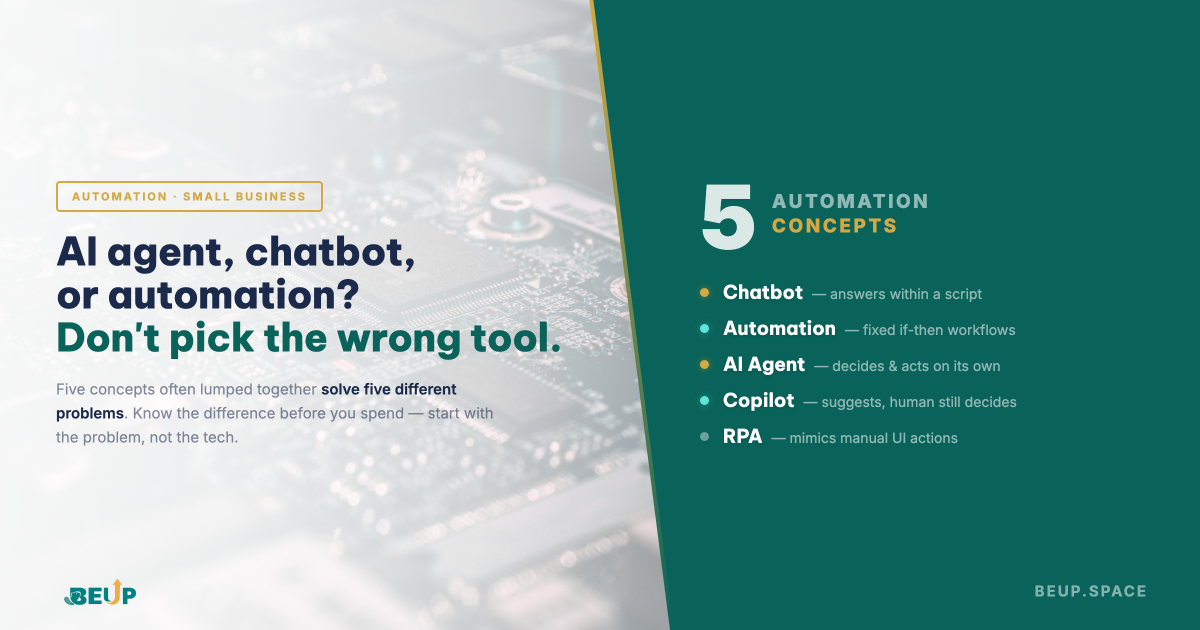
Short answer: Chatbot Answering questions within a predefined framework. Automation (process) Running on fixed if-then rules. AI agent Making decisions and taking actions within a defined scope. Copilot Providing suggestions while still allowing humans to make decisions. RPA Simulating manual actions on existing software interfaces. For small businesses, not every problem requires an agent — start with the problem, not the technology.
An online cosmetics shop with 6 people implemented an “AI chatbot” to reduce the workload for their CS team. Three months later, the owner realized: the rate of completed orders hadn't decreased, the team still spent 4 hours a day handling problematic orders, and the chatbot gave incorrect answers, frustrating customers. The problem wasn't the chatbot — but that they had bought a chatbot for a problem that actually needed an AI agent, and still did manually what could have been done with a simple automation process.
"AI agent", "chatbot", "automation", "copilot", "RPA" — these five concepts are often confused by vendors as if they were interchangeable. They are not. And choosing the wrong type is a common reason why small businesses’ automation projects fail to deliver the promised ROI. This article explains the differences between these concepts in practical terms, along with a real-life case study and a simple rule to choose the right one.
Article contents
When vendors call everything "AI", what's being obscured is a very basic question: who — or what — is making decisions in that process? Answering this question will help you understand which tool you really need. There are three capabilities, and each corresponds to a different group of tools.
The first capability: no one makes any decisions — the system only runs according to pre-written rules. "If the customer fills out the form → send email A. If the order is over 500k → apply a free shipping voucher." This is the domain of automation and RPA. The second capability: machine provides answers within a given frameworkbut doesn't really take action outside of that framework — this is a chatbot. The third capability: machine evaluates the context, chooses an action, and executes it — this is an AI agent. Copilot is in the middle: machine suggestbut humans are still the ones making the final decision.
These three decision-making methods are not mutually exclusive. A smoothly operating business often uses all three in parallel — the issue is using the right type for the right problem.
Chatbot is a question-answering system through a chat interface. The primary task is answernot actionThe scope of answers is limited by the script (rule-based chatbot) or by the training data and context (AI chatbot).
A pure chatbot doesn't place orders on your behalf, doesn't handle refunds, and doesn't contact shippers. It answers questions within a pre-designed scope: FAQ, order status tracking, product introductions, and basic information collection. Even the new generation of "AI chatbots" based on LLM, if not equipped with additional action tools, is essentially just a smarter conversation interface — providing better answers, understanding context better, but still not taking any action within your system.
Chatbots are suitable when the problem is relieves your support team from repetitive questions — return policies, sizes, ingredients, shipping times, whether discounts are still valid. When you need a system that actually to do something (complaint handling, returns, shipping coordination), chatbots are the wrong tool. This is the number one mistake the beauty shop at the beginning of the article made: they bought a chatbot for a problem that required an AI agent.
Automation (or automation process) is a chain of steps programmed in advance, triggered by an event, running according to unchanging if-then rules. No AI, no judgment — same input always yields the same output.
This is the oldest type of automation and also the one that brings the fastest ROI to small businesses. When a customer places an order → send a confirmation email. When the order status changes to “delivered” → trigger an email asking for a review after 3 days. When a customer is inactive for 60 days → add them to a remarketing list. Among the commonly used tools today: Zapier (fast, many ready-made apps, high cost when scaling), Make (visualized as a diagram, suitable for complex processes), n8n (can be self-hosted, significantly cheaper when running many tasks, and — as will be seen later — can be expanded into an AI agent without changing tools).
The strength of automation is predictability — runs correctly 100% of the time, without surprises, and doesn't “hallucinate”. The weakness is cứng: when reality presents a situation not covered by the rules, the system freezes or handles it incorrectly. If your work involves repetition with relatively similar inputs — sending notifications, creating tasks, updating tables — automation is sufficient, and usually cheaper than any AI by an order of magnitude.
AI agent are AI systems granted access to tools (APIs, databases, email, software), given a goal, and allowed to decide the sequence of actions to achieve that goal. Unlike chatbots, they take action; different from automation in that to act outside fixed rules.
AI agents are the most talked-about concept in 2024–2026, and also the most misunderstood. The difference isn't that they're “smarter than chatbots” — the difference is that they have the authority làmnot just nói. An agent given the goal of “processing customer complaints” will read the complaint history, check policies, assess the severity, decide whether to refund, replace, or send a voucher, and then take that action — each case may lead to a different decision.
That's why AI agents are tools expensive, complex, and high-riskIt is worthy when the problem has three characteristics: (1) it is repetitive but each case is different in context, (2) if done manually, it would take many hours of human work per week, (3) the consequences of a wrong decision are within an acceptable range (it won't bring down the company). For small businesses, before deploying an agent, the question to answer is: has this process been written into an SOP? Don't grant decision-making rights to machines if you don't have an SOP.
Regarding implementation tools, the agent ecosystem for small businesses is still forming. The three most popular directions: n8n with an integrated AI Agent node (calling LLM + tool calling + memory within the same process), LangChain (powerful but requires Python/JavaScript coding), and Microsoft Copilot Studio (suitable if already in the Microsoft 365 ecosystem). For businesses without a developer, n8n is the most accessible entry point because it allows building agents with a drag-and-drop interface, while also keeping the entire old automation process in the same tool.
"Automating a good process will increase efficiency. Automating a bad process will increase chaos."
— Bill Gates
Copilot is AI that supports human work, not replaces it. The default model: machine suggestperson approvalGitHub Copilot suggests code, and the programmer accepts or modifies it. Microsoft Copilot suggests Excel formulas, and the employee accepts or rejects them. Copilot is suitable when the final decision still requires human expertise, but the "pre-thinking" part can be delegated to the machine. For small businesses, copilot is the safest step to introduce AI into work — the risk is almost zero since humans still review every output.
RPA (Robotic Process Automation) is software that simulates manual actions on existing interfaces — mouse clicks, keyboard input, copying data between applications without API connections. UiPath and Automation Anywhere are well-known names. RPA was created to solve the problem of "two systems needing to communicate with each other but having no other way than manual copying". This is not AI — just automation at the interface level instead of the API level. For small businesses in Vietnam, RPA is less suitable unless you are stuck between an old software (e.g., internal accounting) and a new system (e.g., e-commerce platform) that cannot integrate with each other.
The above classification helps you understand type of problemis not meant to assign each problem to a specific product. In reality, some tools are designed to span multiple areas — and this is crucial for small businesses as it allows you to start simple, expand gradually, without having to constantly change systems.
n8n is the clearest example. At its core, it's pure process automation — receiving webhooks, running rules, sending emails, logging into Google Sheets. But it has AI Agent node allows you to grant LLM the right to call tools (query databases, call other APIs, write to sheets) and run multiple evaluation steps within the same process — thus moving into the realm of AI agents. And because each process can stop at any node to wait for human approval (wait node + webhook or Telegram approval), the same process can install a copilot model when risk is high.
A typical n8n process for a small business fanpage: Messenger message arrives → categorization by keyword (automation) → logging into Google Sheets CRM (automation) → GPT-4o-mini drafts a response (AI) → pushes to Telegram for employee review (copilot pattern). One process, three different types of “decision-making”.
This is what makes n8n suitable for small businesses looking to take it one step at a time: start with simple automation, gradually add AI to areas that truly require judgment, and keep humans in the loop for sensitive decisions — all within the same tool, without having to purchase separate chatbots, automation tools, and agents. The cost is also significant: n8n cloud has a free tier of 5,000 executions/month (enough for a fanpage with less than 150 messages/day), and self-hosting on a VPS for $5/month becomes more cost-effective as the volume increases.
Summary: When choosing a tool, don’t just ask “what type of tool is this?” — also ask “can this tool handle multiple types of problems as my business grows?” For small businesses, a versatile tool that knows its limits often wins over a set of specialized tools pieced together.
Going back to the beauty shop at the beginning of the article. After the owner sat down and drew out the entire process, they realized the company had five different groups of tasks, each requiring a different tool — not just one “AI chatbot” for everything.
| Problem | Suitable tool | Conclusion |
|---|---|---|
| Customers ask FAQs: return policy, size, ingredients | Chatbot | Answering within a predefined framework — no decision required |
| After a customer places an order — send a confirmation email — remind them to review after 3 days | Automation (process) | Fixed if-then rules, no judgment required |
| Handling complaints: each case has a different context, requiring decisions on refunds, exchanges, or vouchers | AI agent | Requires context evaluation, decision-making, and action |
| CS staff drafts replies for complex emails | Copilot | Machine suggests, human approves — maintains brand voice quality |
| Copying orders from Shopee into internal accounting software | RPA | Two systems without API integration — RPA acts as a bridge |
Summary: There is no single tool that can solve all five problems. Buying an “AI chatbot” and expecting it to do everything is the root of 90% of failed automation projects in small businesses. The correct approach is to start with a process map, identify the problem at each node, and then choose a tool — not the other way around.
Before deciding to use an AI agent, chatbot, or automation, answer these three questions in this order. The order is important — reversing it is the most common way to make the wrong choice.
Question 1: Has this process been written into an SOP? If not, stop. Write an SOP first. Automating an unclear process only accelerates chaos. This is the principle of “systematization before automation” — and the reason why Systematization vs Automation should be read before starting any project.
Question 2: Who is making decisions in that process? If no one is involved (just following rules), use automation. If someone answers customer questions within a predefined framework, use a chatbot. If someone evaluates the context before making a decision, use an AI agent or copilot (depending on the risk level). If someone copies data between software, use RPA.
Question 3: What is the risk when a machine makes a wrong decision? If you lose a VIP customer or leak sensitive data, use a copilot (approver). If it only affects a small case and can be fixed, an AI agent is suitable. Don’t assign decisions to agents that could potentially crash a customer’s system with a single mistake.
In addition to the five concepts mentioned above, there are three pairs of terms that continuously cause small business owners to spend money in the wrong places when vendors introduce them.
LLM vs AI. LLM (Large Language Model) — such as GPT, Claude, Gemini — is a loại AI, which specializes in language processing. AI is much broader and has existed since the 1950s. When a vendor says their product “uses AI”, ask specifically: is it rule-based AI, traditional machine learning, or LLM? These three types have different costs, speeds, and risks. A tool that “uses AI” to calculate prices might just be a complex Excel formula repackaged.
Prompt vs integration. Using ChatGPT to draft emails (copying the question in, copying the response out) is promptingIntegrating ChatGPT into a process to read incoming emails, draft responses, send them, and update the CRM is integrationThese two tasks are vastly different in terms of difficulty and cost. Many small businesses think they are “implementing AI” when they are actually just manually prompting — only to realize later that they lack the infrastructure when they want to scale up to integration.
API vs plugin. A plugin is a pre-built integration that can be easily installed and run — fast and cheap, but less flexible. An API is a protocol for two software systems to communicate, requiring a developer to write code in between — slower and more expensive, but can do almost anything. When the tool you use doesn’t have a plugin for the tool you need to connect, the next question is “does the tool have an API?” If there is no API and no plugin, the last resort is RPA — which is often a sign that you should switch tools, not spend more money.
✍ Key Takeaways
READY-TO-RUN WORKFLOW
FLW-001 — Messenger CRM + AI Reply Draft (n8n process with 19 nodes)
A pre-built n8n process, connecting Fanpage Messenger × Google Sheets CRM × GPT-4o-mini × Telegram. Customer messages are automatically logged into the CRM within 2 seconds, even at 3 am, AI drafts a response in the brand voice, and the employee reviews and sends it. Three types of “decision-making” in the same process — a correct example as analyzed above. Saves ~4 hours/week for a fanpage with 100–200 messages/day.
An AI agent has the ability to perform actions within your system — create orders, process refunds, send emails, update databases. A chatbot only responds within a conversation interface. A so-called "AI chatbot" using modern LLMs is still a chatbot if it's not given the ability to work outside of its response framework. The difference lies in the actions, not the intelligence of the response.
Most don't need it. 80% of small business automation problems can be solved with simple process automation (Zapier, Make, n8n) at a cost of less than 500,000 VND/month. AI agents are justified when you have a repetitive process but each case is different in context, have written it into an SOP, and spend at least 10 hours of human time per week handling it manually. Below this threshold, investing in an agent usually doesn't pay off.
Traditional chatbots (rule-based) run according to fixed scripts: the customer selects a button, and the bot responds with a pre-written answer. AI chatbots based on LLMs understand natural language questions and respond more flexibly, based on the data they've been given. Both don't take action outside of their response framework. The main difference is the quality of language understanding and the ability to handle questions not in the script.
No. RPA (Robotic Process Automation) is software that simulates human actions on an interface — clicking, typing, copying data. It runs according to fixed rules, without learning or judgment. RPA was created to connect two systems without an API. Many vendors call RPA "intelligent automation" to sound more modern, but it's closer to traditional automation than AI.
Start with a specific process that has been written into an SOP and consumes at least 3-5 hours of human time per week. Choose a simple automation process (Zapier, Make, n8n, or custom-built with Google Apps Script if using Google Workspace). Avoid choosing an AI agent for the first project — high risk, hard to debug, hard to evaluate ROI. After 1-2 successful processes, expand to copilot and AI agents for more complex problems.
A copilot always has a human making the final decision — the machine suggests an email, and the human reviews and sends it. An AI agent is given a goal and performs a series of actions without human intervention — the machine reads, decides, and sends. Copilots are low-risk, easy to deploy, and suitable for tasks that require human expertise. Agents are high-risk, complex to deploy, and suitable for repetitive tasks with varying contexts.
n8n is a process platform — at its core, it's process automation (if-then based on triggers), but it has an AI Agent node that allows LLM to call tools and run multiple evaluation steps, moving it into the realm of AI agents. And because each process can stop at any node to wait for human approval (wait node + webhook or Telegram approval), the same process can install a copilot model when risk is high.
References: Michael Gerber — The E-Myth Revisited References: Bill Gates on automation at Microsoft · Andrew Ng, "The batch — Agentic AI" (2024) · McKinsey, "The state of AI in 2024"
Get insights on management, operations & digital assets delivered to your inbox.

Copyright © 2026 BEUP Learning Solutions
MST: 3301755602
Book a free consultation to explore how BEUP can transform your workflow.
Book a Consultation →Digital Asset Ecosystem & Operating System for individuals & teams.