No products in the cart.






Solopreneur Business OS + Live Dashboard — The Free Notion OS for Solo Founders
Free
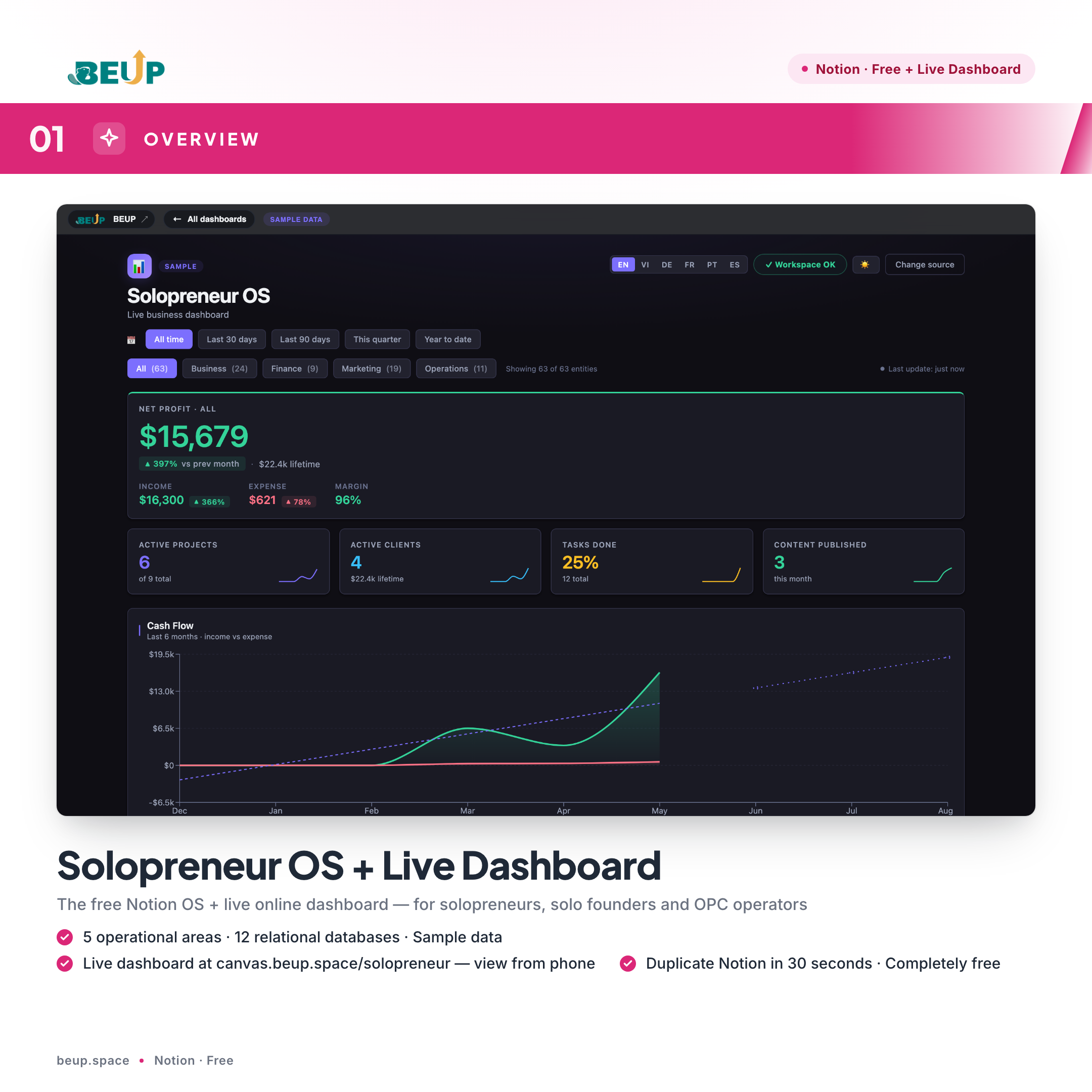
A free Notion OS + a real-time live dashboard for solopreneurs, solo founders and OPC operators. Five operational areas — Projects, Clients, Content, Finance, Goals — connect through 12 relational databases. Includes free access to BEUP Canvas at canvas.beup.space/solopreneur: turn your Notion OS into an interactive dashboard with KPIs and charts — viewable on phone, no Notion app needed.
Sold: 0 items
Category:
BEUP Brain
Running a business solo often means jumping between disconnected tools — spreadsheets, messaging apps, notes and calendars — without ever seeing the full picture. Solopreneur Business OS consolidates the entire operation into a single Notion workspace, enough to make decisions within 30 seconds of opening your laptop.
🆕 FREE LIVE DASHBOARD — BEUP CANVAS
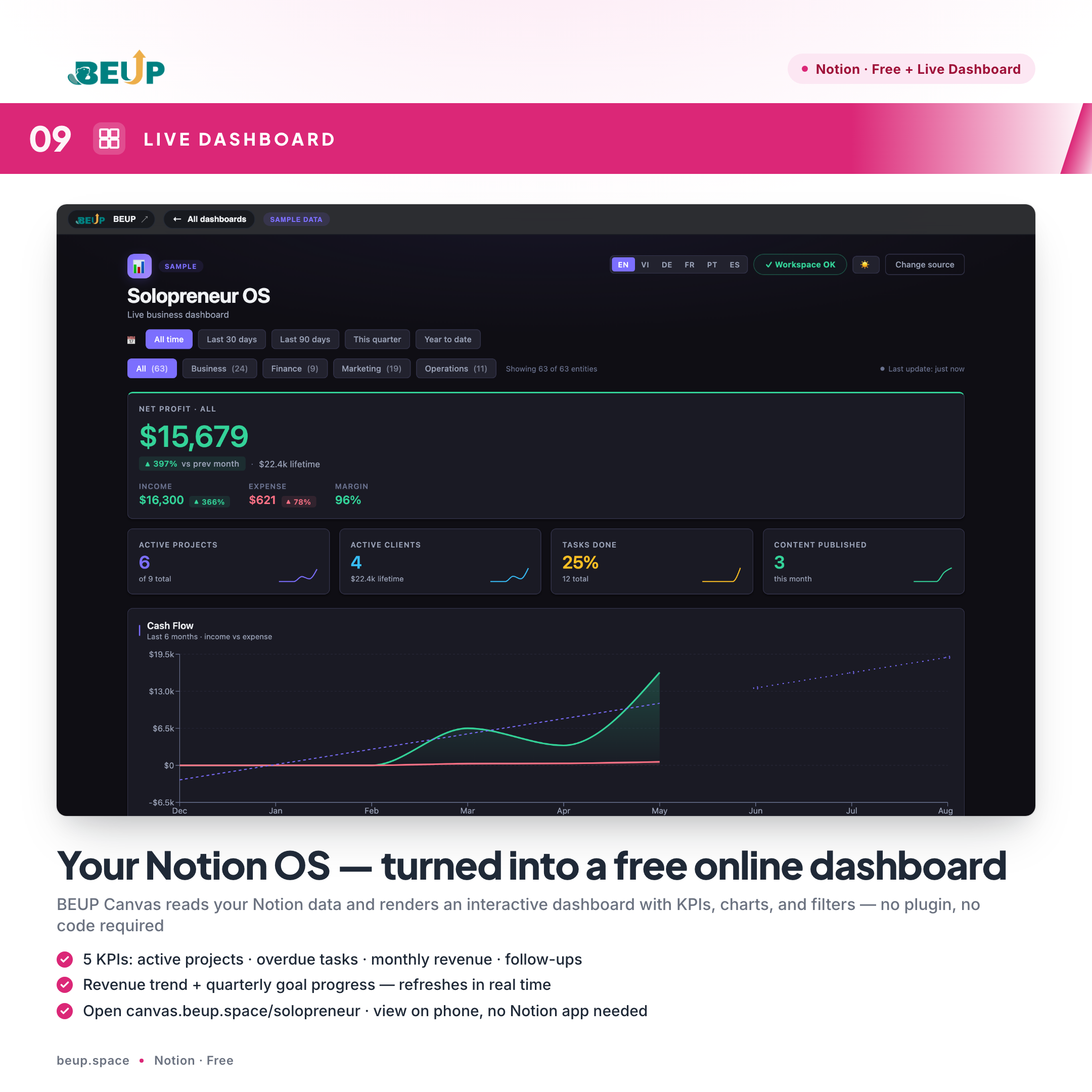
Along with this Notion OS, you get free lifetime access to BEUP Canvas — turn your Notion workspace into an interactive online dashboard in 30 seconds.
- Open it now: canvas.beup.space/solopreneur
- How it works: connect your Notion workspace → Canvas renders a live dashboard with real-time KPIs, revenue trend chart, and quarterly goal progress
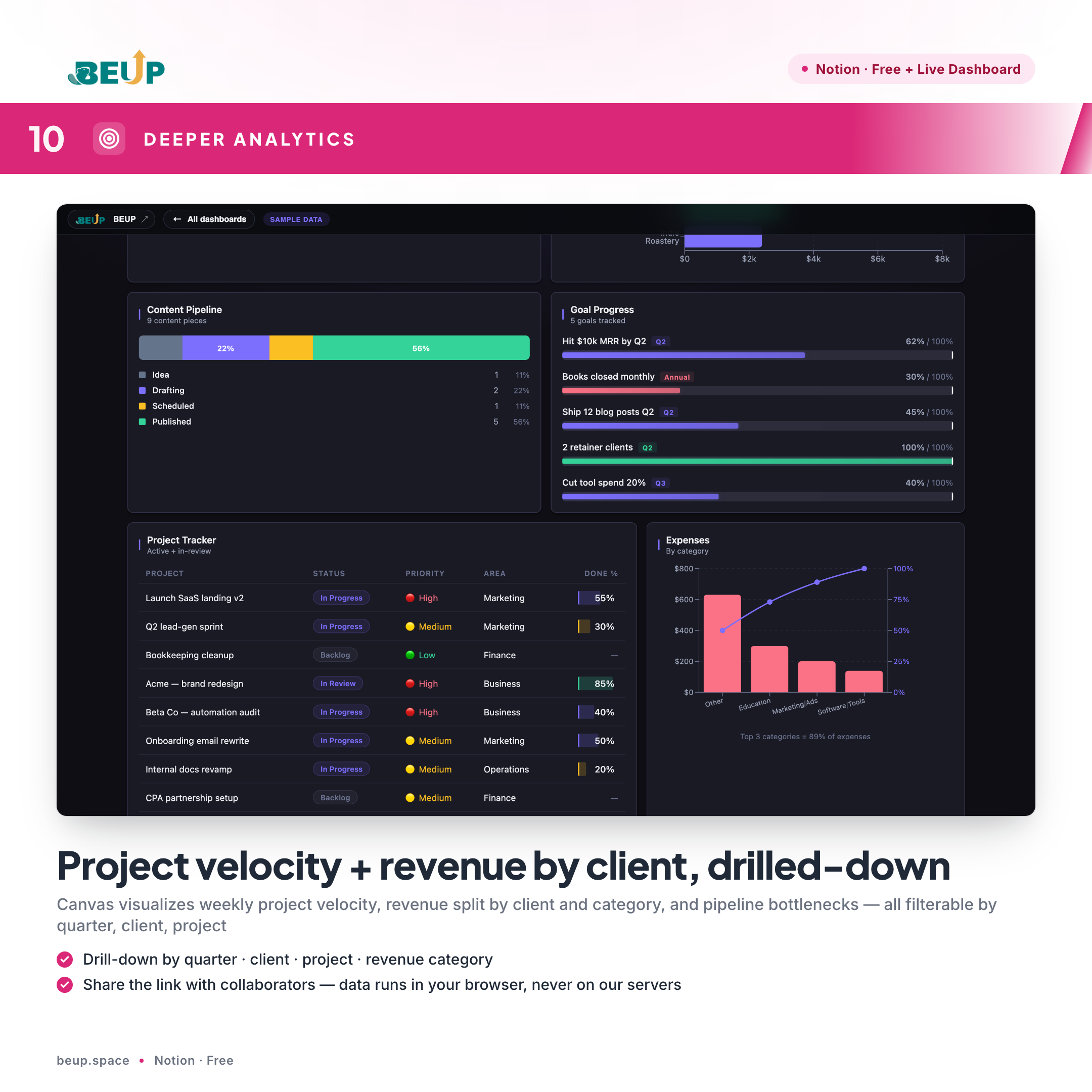
- Features: drill-down by quarter / client / project / category, shareable links for collaborators, mobile-friendly (no Notion app needed)
- Privacy: Canvas runs entirely in your browser — your data is NEVER stored on BEUP servers
- Auto-sync: every time you update Notion, the dashboard updates with it
Included free with the template (no extra fee). This is BEUP's unique edge — other Notion templates ship just the workspace; we ship the live dashboard too.
MAIN FEATURES
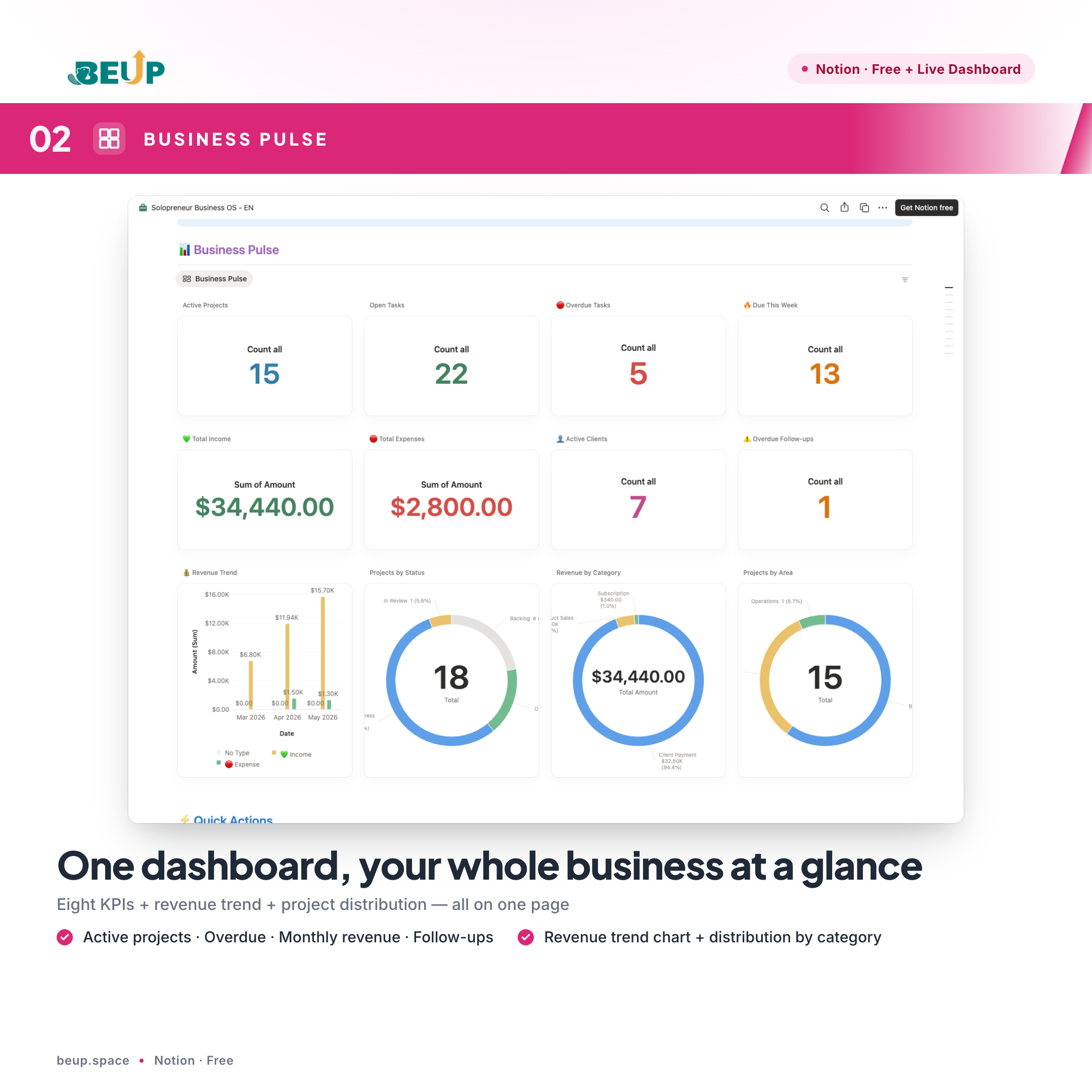
- Business Pulse — A master dashboard showing eight KPIs (active projects, overdue tasks, monthly revenue, follow-ups due), a revenue trend chart and project distribution by status.
- Quick Actions — Pre-built buttons to add a task, client or invoice in a single click. Sensible defaults reduce data-entry time.
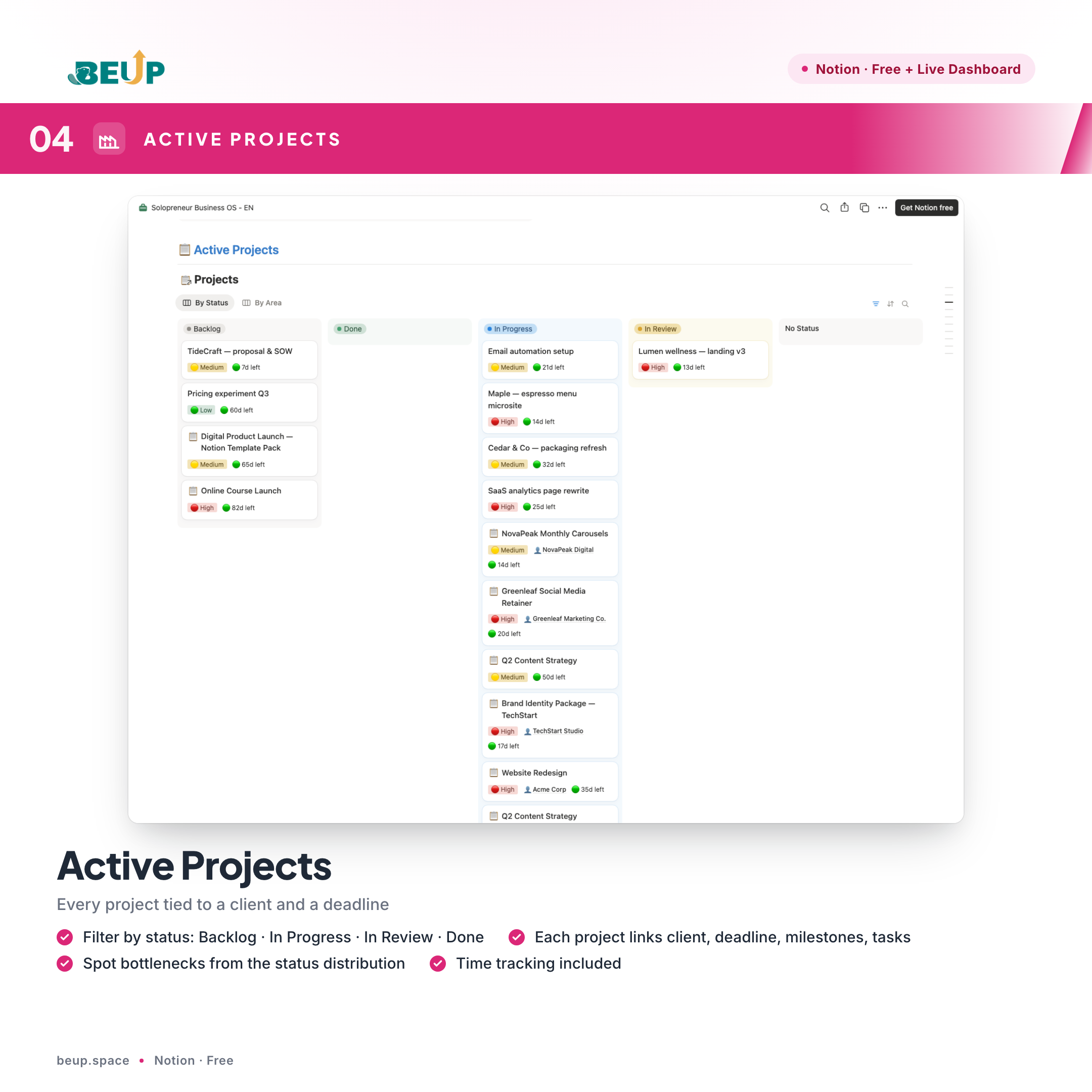
- Active Projects — Every project links to a client, deadline, milestones and task list. Filter by Backlog · In Progress · In Review · Done to spot bottlenecks.
- Focus Tasks — Priority task list filtered by Today, This Week or Overdue. Includes a Kanban view (drag and drop by status) and a Pomodoro-friendly structure.
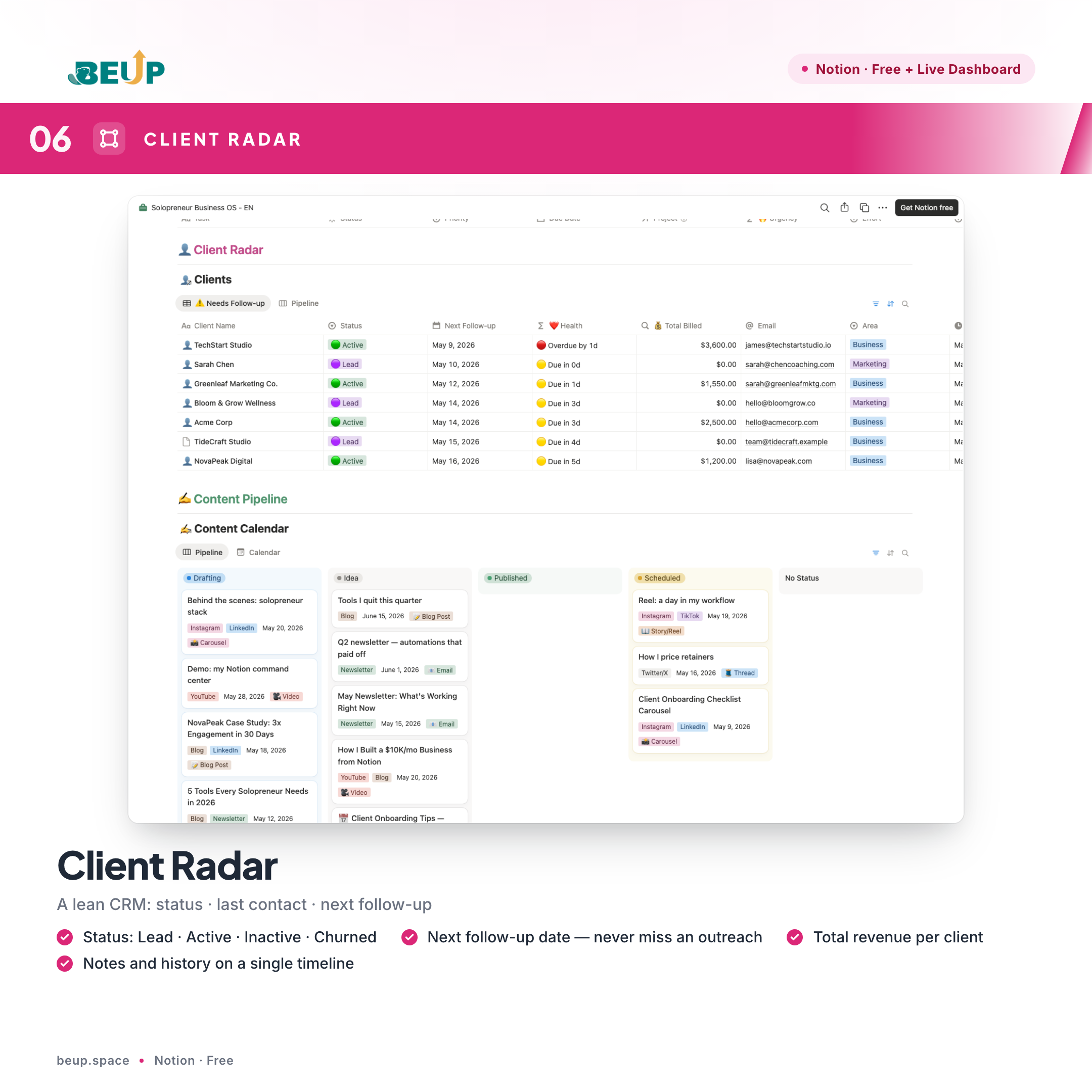
- Client Radar — A lean CRM tracking status (Lead · Active · Inactive · Churned), last contact, next follow-up date and total revenue per client.
- Content Pipeline — An editorial calendar from idea to publish across five stages, segmented by channel (blog, social, email, video). Calendar, table and Kanban views supported.
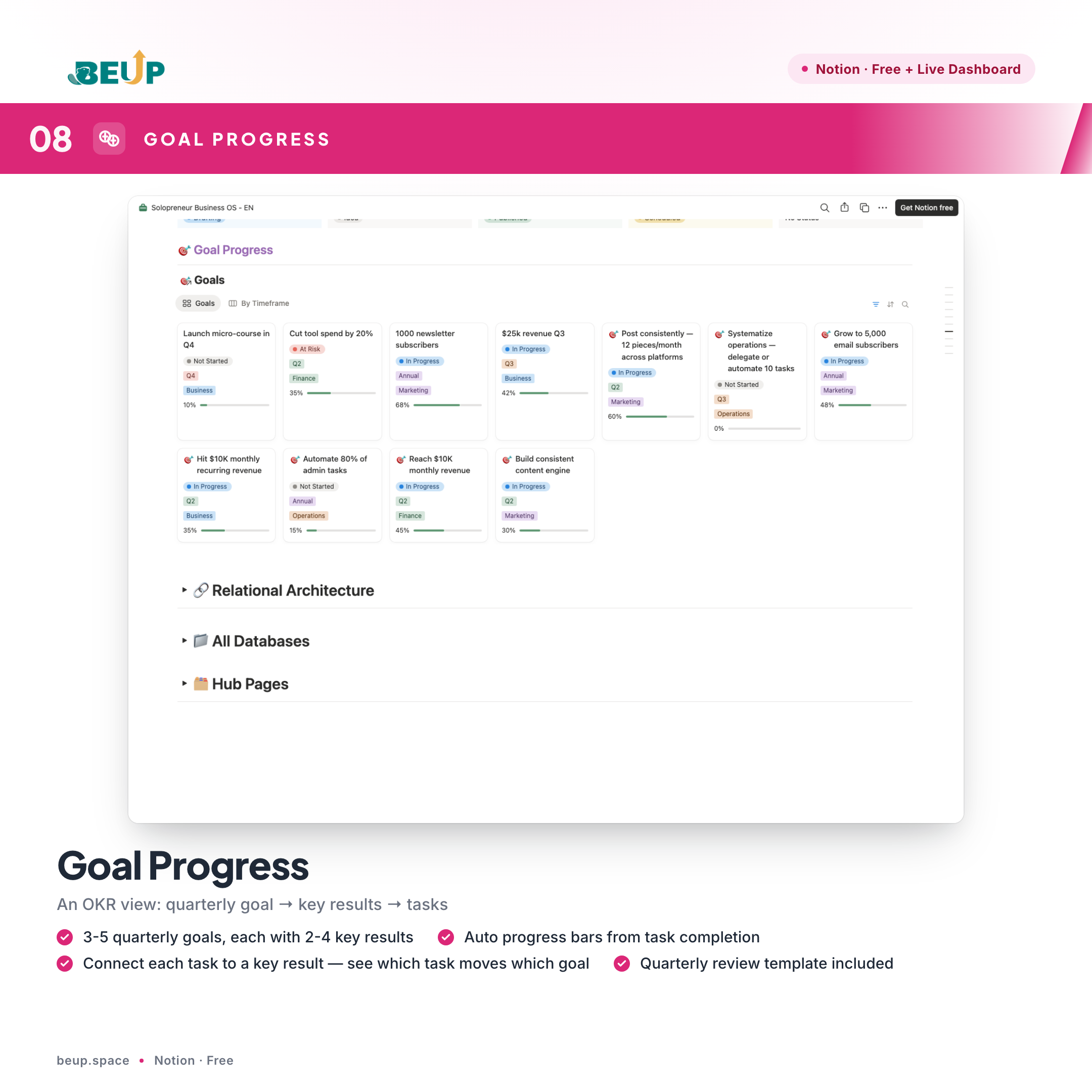
- Goal Progress — A quarterly OKR view (objectives and key results). Each task links to a key result; progress bars update automatically as tasks complete.
- Linked Databases — 12 relational databases connect: every task belongs to a project, every project to a client, every client to its revenue — no duplicated updates across silos.
WHO IS THIS FOR?
- Solopreneur — running an entire business alone and needing a system instead of ten disconnected tools.
- Solo founder — building a product or service in early stages, needing to track projects, clients and finance in one place.
- OPC (One Person Company) operator — a single-member legal entity that needs clear operational structure for reporting and sustainable growth.
- Freelancer or 1-3 person agency — managing multiple clients in parallel, needing a lightweight CRM and a content pipeline.
The system has been tested with about 200 active tasks, 30 projects and 50 clients in parallel without performance degradation. For teams of five or more, see Small Team OS Pro.
WHAT'S INCLUDED?
- 1 Notion workspace with 12 relational databases.
- 8 main dashboard views (Home, Projects, Clients, Content, Finance, Goals, Review, Guide).
- Sample data included — remove when no longer needed.
- Step-by-step guide built into the workspace.
- Free lifetime access to updates.
HOW TO USE
- Sign up: Enter your email to receive the Notion link.
- Duplicate: Open the link → click "Duplicate" in the top right → choose your workspace.
- Initialise: Open the Home page → read the Guide → fill in three goals for the current quarter.
- Operate: Update tasks and revenue daily — the dashboard refreshes automatically.
- Weekly review: Open the Review template → check goal progress → adjust priorities for the next week.
COMPARE WITH OTHER SOLUTIONS
| Criterion | Solopreneur OS | Disconnected spreadsheets | SaaS software |
|---|---|---|---|
| Cost | Free | Free | $20-50/month |
| Database linkage | ✓ | ✗ | ~ |
| Customisation | ✓ | ✓ | ~ |
| Suited to one operator | ✓ | ~ | ✗ |
| Ready on day one | ✓ | ✓ | ✗ |
| Learn in 30 minutes | ✓ | ~ | ✗ |
SYSTEM REQUIREMENTS
- Notion: A free Personal account is sufficient.
- Browser: Recent Chrome, Safari or Firefox.
- Device: Desktop, iPad or phone — Notion adapts.
FREQUENTLY ASKED QUESTIONS
Is the product really free?
Yes. This version is free indefinitely. BEUP maintains a free tier as the entry point for users evaluating the operating system.
Can the template be customised?
Yes. After duplicating, the workspace is yours — change the structure, rename items, add or remove databases freely.
Do I need prior Notion experience?
Not required. The in-workspace guide is detailed enough for new users to be productive within 30 minutes.
Is there a paid product for larger teams?
Yes. Small Team OS Pro is built for teams of 5-15 people with 11 databases, expanding on Solopreneur OS.
Only logged in customers who have purchased this product may leave a review.
Related products
- Buy Now This product has multiple variants. The options may be chosen on the product page

A Digital Asset Ecosystem and Work Operating System for Individuals & Teams
SUPPORT
Copyright © 2026 BEUP Learning Solutions
MST: 3301755602
Reviews
There are no reviews yet.