No products in the cart.



The automation trio · Service businesses
Same team —
double the output, without new hires.
Three packaged automation workflows for agencies, e-commerce, coaching, and B2B service teams in Vietnam — auto-reply to customer messages, syndicate content to five channels, and triage support tickets. Deploy in a single day, runs reliably on n8n community edition.
Works on n8n community & Cloud Starter
No developer required
Vietnamese & English versions
Single-node CONFIG setup

Same workload — two ways to handle it
Service teams receive the same inputs every day: Messenger messages, support emails, blog posts, intake forms. The way you handle them decides both speed and quality.
BEFORE · No automation system
Every input funnels through one person
Daily inputs
Messenger messages
~80 per day
Emails & support forms
~30 requests per day
New blog posts
1–2 per week
›
You / your support team
22 hrs/week
⚠ Bottleneck
›
Consequence
×Urgent (P1) requests miss SLA by 8 hours, customers churn
×30% of social posts never get published
×Support team burns out, turnover spikes
×Founder doing support after hours
↓
BEUP Flow solves this by inserting 3 automation workflows in the middle, so you only review instead of doing the work
AFTER · 3 automation workflows
BEUP does 70%, you decide the 30%
Daily inputs
Messenger messages
~80 per day
Emails & support forms
~30 requests per day
New blog posts
1–2 per week
›
3 BEUP workflows
Customer service assistant
Automatic reply & message classification
Ticket classification
SLA monitoring, prioritises urgent tickets
Duplicate content
One blog post → 5 social channels
›
You approve in one tap
7 hrs/week
✓ Time freed up for strategy
›
Result
✓100% SLA met, zero churn
✓Full multi-channel content distribution
✓Stable team, no extra hires needed
✓Founder sleeps through the night
Data architecture pattern — you don't change the input sources, you only insert 3 automation workflows in the middle. See each workflow in detail →
Where service businesses lose time every week
After consulting with 40 agency, e-commerce, and B2B service teams (5–20 people each) in Vietnam, we identified four sources of repetitive waste.
💬
Manually replying to 80+ messages a day
Repeat questions account for ~70% of inbound — your support team copies, edits, and sends the same answers all day.
≈ 15 hours per week · one full-time headcount
📝
Reposting one blog to five social channels
Each platform demands a different voice and length. Four hours per article is the industry standard.
≈ 16 hours per month · one marketing headcount
🎫
Spotting urgent tickets only after 8-hour delays
Without centralised SLA monitoring, response times slip and churn climbs.
≈ $80–$160 lost per month from churn
🌅
Founder doing customer support after hours
Checking Slack at 10pm, waking up to 30 support requests — a burnout loop that kills strategic focus and the ability to scale.
Strategic work gets squeezed out
Three workflows. One deployment. Always running.
Each workflow owns one operational lane — customer care, content marketing, technical support. Once imported into your n8n, all three run independently 24/7.
Workflow 1
💬
Customer care assistant for Messenger & Zalo OA
Customer message → AI drafts a reply in your brand voice → you approve in one tap on Telegram → it logs to your CRM.
Workflow 2
✨
Multi-channel content syndication
Blog or YouTube URL → AI generates five platform-tailored variants → Buffer schedules them across five days.
Workflow 3
🎫
Ticket triage & SLA monitoring
Email or support form → AI identifies issue category and priority → assigns the right teammate → warns you before SLA breach.
▸After purchase you receive three workflow JSON files. Import into your n8n — self-setup takes about 30 minutes per workflow.
▸Each workflow has a single
⚙️ CONFIG node. All parameters (Sheet ID, OpenAI key, Telegram chat ID) are set in one place.▸Inline guidance notes are embedded in every workflow in plain English — read as you go, no thick PDF needed.
Workflow 1
Auto-pilot customer care for Messenger & Zalo OA
Every customer message is captured the instant it arrives. The system parses it through OpenAI GPT-4o-mini, drafts a reply in your brand voice, and logs the conversation into a Google Sheets CRM.
You receive a Telegram notification with the suggested reply — one tap and it's sent. You retain full control of the content, so the wrong answer never goes out.
- Activate
- Webhook from Facebook Messenger and Zalo OA
- Integration
- Messenger · Zalo OA · OpenAI · Google Sheets · Telegram
- Real-world result
- Automates ~80% of repetitive messages, saves 15 hours per week
B
BEUP CRM
📩 New message — Pro plan customer
Mark • Facebook Messenger • 14:23Customer asked:
“Does your Pro package support data migration? Our company has 50,000 legacy customers with a non‑standard structure.”Assistant's suggested reply:
“Yes, we do. The Pro package offers free data migration up to 100,000 records. We’ll map fields one‑to‑one or transform them if the structure differs. Would you like to schedule a 30‑minute demo to discuss details?”Confidence: 87%
14:23✓✓
Workflow 2
One blog post. Five channels. Thirty minutes of work.
When you drop a blog or YouTube URL into your Google Sheet, the system extracts the content and generates five platform-tailored variants — long-form for LinkedIn, a thread for X, a carousel for Threads, and brand-tuned posts for Facebook and Instagram.
Telegram pings you with a preview. Once you approve, Buffer schedules all five posts across the next five days. You never have to open each platform and paste content again.
- Activate
- New row in Google Sheet or web form
- Integration
- OpenAI · Buffer · Google Sheets · Telegram
- Real-world result
- From 4 hours per post to a 30-minute approval — saves 16 hours per month
M
BEUP Marketing
✨ Post syndicated to five channels
15:47 • Run #2034Source:
“5 ways to reduce churn for B2B SaaS”
blog.beup.vn/reduce-churnFive variants generated:
• LinkedIn — 280-word long-form post
• X — 8-tweet thread
• Threads — 5-slide carousel
• Facebook — post with 3 hashtags
• Instagram — caption + reel scriptSuggested schedule via Buffer:
Tue 10:00 → Sat 18:00 (5 consecutive days)View full draft: bit.ly/run-2034
15:47✓✓
Workflow 3
AI ticket triage with pre-SLA-breach alerts
Every support request — labelled emails or webhook form submissions — is analysed by AI to identify the issue category (technical bug, billing, how-to, feature request), priority level P1 through P4, and a suggested first response.
The system auto-assigns the right teammate based on skills and current workload, and re-checks SLA compliance every 15 minutes. If a deadline is approaching, leads get notified before the breach happens — no more P1 tickets slipping through the night.
- Activate
- Email with the “Support” label or form webhook
- Integration
- Gmail · OpenAI · Google Sheets · Telegram
- Real-world result
- P1 tickets stop slipping overnight — cuts churn loss by ~$80 per month
H
BEUP Support
🎫 New ticket — #2026-1842
14:31 • received via emailCustomer:
Mark • mark@xyz.com
Plan: Pro • 14-month customerReported issue:
“I can’t export a CSV file from the admin page; it was working fine yesterday.”Auto-classification:
• Category: Technical bug
• Priority: P2 · 8-hour SLA
• Assigned to: Hung (Senior support)
Active load 3/5 · admin-area expertise matchSuggested first response:
“Hey Nam, I’ve logged the issue. Which browser are you using and are there any error messages displayed? I need to replicate the error to resolve it quickly.”⏰ SLA deadline: 22:30 today
14:31✓✓
Inside the workflow
View the n8n graph directly. Zoom in and drag to inspect each node.
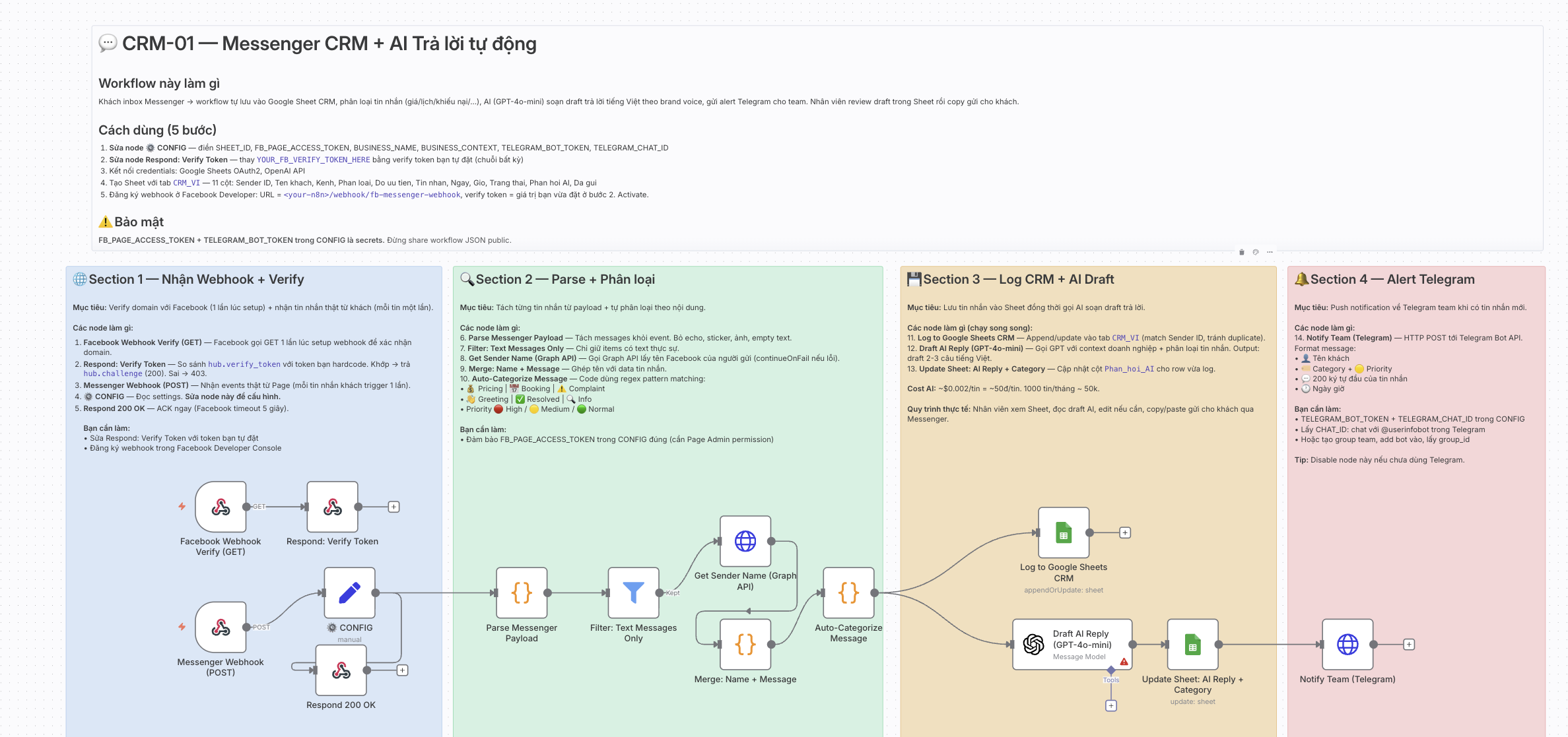
Tip: hold Ctrl + scroll to zoom · drag to pan · click ⤢ for fullscreen · Esc to close.
What you get after purchase
All assets are emailed to you the moment your payment is confirmed. Both English and Vietnamese versions are included.
📁
Three workflow JSON files
Customer Care · Content Syndication · Ticket Triage · all wired with the CONFIG node for centralised setup.
Delivered via email after payment⚙️
Centralised CONFIG node
Sheet IDs, API keys, Telegram chat IDs — all set in one place. No need to open every node.
Bundled inside the workflow files📝
English guidance notes inline
Every workflow is segmented with clear annotations so your team grasps the logic the moment they open it.
Bundled inside the workflow files📄
Setup guide
Step-by-step setup guide, checklist, Google Sheet template, and common scenarios.
Delivered via email after payment
Use the language switcher in the top-right corner to flip between English and Vietnamese.
BEUP Kit · BEUP Crew · BEUP Lodge
Three levels of involvement — modelled after the beaver's life cycle in nature. Build the dam yourself, have BEUP's crew build it, or have BEUP maintain the whole lodge long-term?
🦫
New to BEUP? Start small
BEUP Taste — 1 workflow, $10
Buy just the Customer Care workflow (Messenger + AI) to feel BEUP's quality before committing further. Happy with it? Upgrade to Kit for only $20 more (we credit the $10 you've already paid).
Why do BEUP Crew and BEUP Lodge start with a free consultation?
Every service business has different infrastructure, brand voice, and roadmap. We don't deploy unless we understand your needs first — a short 15-30 minute consultation lets us recommend the right option, and you decide whether to proceed. No commitment up-front.
Every service business has different infrastructure, brand voice, and roadmap. We don't deploy unless we understand your needs first — a short 15-30 minute consultation lets us recommend the right option, and you decide whether to proceed. No commitment up-front.
Self-deployed
BEUP Kit
$30
one-time · ~750,000 ₫ · keep forever · 50% off first 50 orders
Buy Kit · $30Instant download after payment. Best if you already know n8n.
Most popular
Done-for-you deployment
BEUP Crew
$140
one-time · ~3,500,000 ₫ · saves 6+ hours of setup
Book 30-min consult (free)BEUP deploys + trains + tunes prompts to your brand voice.
Long-term managed
BEUP Lodge
$30/mo
~750,000 ₫/mo · 3-month minimum · auto-renews
Book 30-min consult (free)BEUP hosts + monitors 24/7 + monthly tuning call.
View the full comparison on a larger screen.
With the Taste, Kit, and Crew tiers, n8n license and server costs are on you. Recommended: n8n Cloud Starter (~$20/mo) or self-hosted on a VPS (from ~$5/mo). The Lodge tier already includes infrastructure.
Running inside Vietnamese service teams
Three representative cases — quotes will be replaced with verbatim feedback after the public launch.
TQ
Tuan Q.
Founder · Growth agency, 12 staff · Ho Chi Minh City
“The Customer Care workflow handles about half the load of a full-time support agent. After one month we didn't need to hire — that's roughly $480 per month saved on headcount.”
saves ~$480 per month
LM
Linh M.
Head of marketing · Agency, 18 staff · Hanoi
“Content syndication is the standout. We used to spend four hours adapting each blog post; now we paste a link and come back 30 minutes later to approve.”
saves 16 hours per month
DH
Dung H.
Engineering lead · Coaching business, 8 staff · Da Nang
“The Ticket Triage workflow caught three P1 tickets in the first month — each one would have churned roughly $160–$240 if it had slipped overnight. The whole bundle paid for itself in two weeks.”
break-even in two weeks
Frequently asked questions
Twelve specific questions surfaced during our consults — with detailed answers.
1. We don't have a developer on the team — can we still deploy this?
BEUP Kit requires only basic skills: importing a JSON file into n8n and pasting your API key — every step is guided, takes about 10 minutes. With BEUP Crew and BEUP Lodge, BEUP handles the full setup; you only need to grant access to n8n and Google Sheets.
2. Which version of n8n do I need? Is Enterprise required?
Enterprise is not required. The bundle runs reliably on either: self-hosted n8n community edition (Docker or a VPS from $5/month), or n8n Cloud Starter ($20/month). This is BEUP Flow's core difference — we deliberately avoid Enterprise-only features such as
$vars environment variables and project-level permissions.3. What exactly do I get after purchase?
Three JSON workflow files (each supporting both Vietnamese and English), a PDF setup guide, a standard Google Sheet template, and an onboarding video. All delivered via email after payment.
4. How long does self-deployment really take?
About 30 minutes per workflow if you already have a Telegram bot, Google Sheets, an OpenAI key, and a Buffer token. If you're signing up for those services from scratch, total time runs 1.5–2 hours. All three workflows together: 90 minutes to 6 hours depending on your starting point.
5. Which AI model does it use? What's the monthly cost?
Default is
gpt-4o-mini — good enough for customer-care replies and ticket triage, while being cheap. Rough estimates: Customer Care at 80 msgs/day ~$3/month, Content Syndication at one post/day ~$5/month, Ticket Triage at 30 tickets/day ~$2/month. Total OpenAI spend ~$10/month. You can swap in Claude or Gemini by replacing the model node.6. We don't use Buffer — can we swap in another scheduler?
The Content Syndication workflow defaults to Buffer because it supports all five platforms through one unified API. You can swap in Hootsuite, Sprout Social, Postiz (open source), or call each platform’s API directly. With BEUP Crew and BEUP Lodge, BEUP does the swap for you; with BEUP Kit, the PDF guide includes step-by-step instructions.
7. Does the Customer Care workflow support Facebook Messenger, Zalo OA, or both?
Both. The workflow has two separate webhook triggers (Facebook Messenger and Zalo OA) that feed into a single AI pipeline and write into the same CRM sheet. Activate whichever branch matches the channel you actually run. Both use OpenAI to draft suggested replies.
8. Is the English version a machine translation or hand-authored?
The English version is hand-authored from scratch — including the in-workflow annotations, Telegram message templates, error messages, and the OpenAI prompts themselves. It's not a machine translation. Each workflow has two distinct IDs (VI and EN); import whichever fits your team.
9. Can I modify the workflows? Can I resell them?
You have full rights to modify, duplicate, integrate into internal systems, change prompts, swap AI providers, and add sub-workflows. However, you may not resell the original workflows to third parties or build a SaaS product where these workflows are a core component. The licence applies to the end user, not to redistributors. If you're an agency that needs to deploy this for clients, please ask about our reseller plan.
10. What's the refund policy if the workflows don't work for us?
100% refund within 14 days of purchase, no reason required. Applies to all tiers: BEUP Taste, Kit, and Crew. The Lodge tier is refunded pro-rata for unused months. Email
support@beup.space — BEUP processes refunds within 3 business days.11. What happens when OpenAI or Buffer changes their API?
With BEUP Lodge, BEUP applies updates for free on our managed infrastructure. BEUP Kit and BEUP Crew customers receive a patch via email within 2 weeks, including a migration guide for any breaking changes. Free updates for the first 6 months; after that, $29/year for major upgrades.
12. We sell services internationally — does the AI handle a business English tone?
The English version has its own prompt system, defaulting to a “professional but friendly” tone. You can customise it inside the CONFIG node: brand style (formal, warm, or creative), industry context, and a list of words to avoid. The PDF guide includes best-practice templates.
Ready to free your team from work that should already be automated?
Three workflows. One deployment. Always running. Pays for itself in the first month for service teams of 5–20 people.
